

• Login
  • Register
Wednesday, June 10, 2026
Generate QR Codes
Free PDF Tools
Free Web Audit 360
TechSansar.com
  • Services
  • Top Posts
  • Nepali IT
  • Startups
  • Tech News
  • Categories
    • News
      • Tech
No Result
View All Result
TechSansar.com
  • Services
  • Top Posts
  • Nepali IT
  • Startups
  • Tech News
  • Categories
    • News
      • Tech
No Result
View All Result
TechSansar.com

How to use a removable disk for Windows's ReadyBoost? Increase your system performance by using your pen drive as an alternative to extra RAM

ts by ts
January 9, 2010
in Computing, Tips & Tricks
A A
0

Run ahead, utilize your 8GB pen drive. Windows ReadyBoost can use storage space on some removable media devices, such as USB flash drives, to speed up your computer. When you insert a compatible device, the AutoPlay dialog box will offer you the option to speed up your system using Windows ReadyBoost.

This is all about speeding your system using Pen drive or any other memory stick that is supported by your Windows Vista or 7 or 8 machine. The functioning of ReadyBoost in Windows 8 and 7 is exactly the same as in Windows Vista as explained here.

Follow these very simple steps to ensure things going well.

  1. Plug a flash drive or other removable media device into your computer. This should automatically open AutoPlay.If AutoPlay does not open, it might have been disabled. Visit control panel options or Troubleshoot AutoPlay problems in the control panel or help box, goto Control PanelAutoPlay.
  2. Under General Options, click Speed up my system.This will display the Properties dialog box for your flash drive or other removable media device.
  3. Click the ReadyBoost tab, and then do one of the following:
    • To turn ReadyBoost off, click Do not use this device.
    • To turn ReadyBoost on, click Use this device, and then move the slider to choose how much of the available space on your flash drive you want to reserve for boosting your system speed. (Maximum space allocated is indicated by the uppermost sliding end, in the illustration it’s 4090MB for a 8GB Transcend JetFlash V10 of which 7.31GB is free space.)
  4. Click OK. And get ready to feel your  system’s running faster than before.
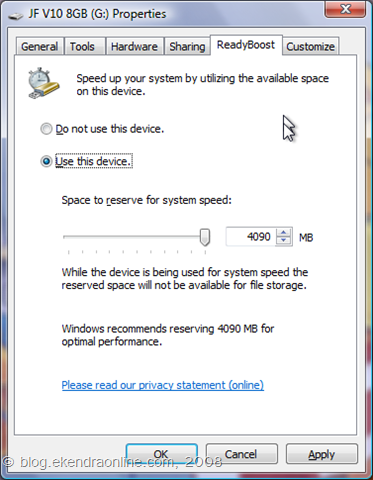
ReadyBoost feature in Windows computers utilizes your removable thumb drive as a RAM

Some USB storage devices or media disks contain both slow and fast flash memory, and Windows can only use fast flash memory to speed up the machine. So ensure that your pen drive is fast memory type flash device and fortunately most of them are.

Related Post

Nepal Budget 2083/84: A Comprehensive Reference on the Tech, IT and Innovation Provisions

Top 10 iOS 18 features that you can’t ignore #iOS18

Be AI literate in 2024 – here is how to #AILiterate #ChatGPT #bard #claude #LLMs

Try Google’s new Search Generative Experience, you won’t return back!

The recommended amount of memory to use for ReadyBoost acceleration is one to three times the amount of random access memory (RAM) installed in your computer. For instance, if your computer has 512 megabytes (MB) of RAM and you plug in a 4 gigabyte (GB) USB flash drive, setting aside from 512 MB to 1.5 GB of that drive will offer the best performance boost. And by now, you must have guessed that my system got memory lesser than 4GB, and yes it’s 3072MB RAM. And oviously, my 8GB pendrive would occupy for it 1/2 the size ie 4 GB around, as a rule of fact. And finally I consider my nett RAM as around 7GB though it’s virtually true.

Originally from How to use a removable disk for Windows Vista’s ReadyBoost? Increase your system performance by using your pen drive as an alternative to extra RAM from Ekendra’s blog.

Tags: Tips & TricksTutorialsWindows VistaWindows-7
Share212Tweet133Send
Previous Post

Top Websites of Nepal -most popular and visited sites

Next Post

How to Configure DIGICOM ADSL Router for NTC ADSL

Related Posts

Nepal budget 2083-84 on IT
Computing

Nepal Budget 2083/84: A Comprehensive Reference on the Tech, IT and Innovation Provisions

On Jestha 15, 2083 (May 29, 2026), Finance Minister Dr. Swarnim Wagle tabled the FY 2083/84 federal budget in a...

by Team TechSansar
May 30, 2026
Top iOS 18 features
Computing

Top 10 iOS 18 features that you can’t ignore #iOS18

Apple recently unveiled iOS 18, the latest iteration of its mobile operating system (should we say iPad and WatchOS and...

by TechSansar Editor
September 10, 2024

Recent News

Illustrating Sovereign AI Compute in Nepal Syuchatar with circuitary

Syuchatar in Regional Context: A Policy Commentary on Sovereign AI Compute

May 31, 2026
Technical explainer on Nepal's announced Sovereign AI Compute Center at Syuchatar. What Budget 2083/84 specified, what it didn't, and the four design questions that decide its outcome.

Nepal’s Sovereign AI Compute Center at Syuchatar: A Technical Explainer

May 30, 2026
Nepal budget 2083-84 on IT

Nepal Budget 2083/84: A Comprehensive Reference on the Tech, IT and Innovation Provisions

May 30, 2026
Success Story of a GovTech

Nepal’s Department of IT Saved Rs 98 Crore with Centralized A2P Messaging: A GovTech Success Story

December 31, 2025
Hostinger
  • News
  • Tech
  • Event
Generate free QR Codes with QRSansar

TechSansar.com, ICT For Media Pvt Ltd, Regd #249079/077/078, VAT #609868175.
By continuing to use this site, you agree to our cookies and privacy policies.
Here is our Do Not Track (DNT) Guide. Hosted on a VPS and uses this free PDF tool. You can also subscribe to our newsletter.
Creating tech contents for the b̶o̶t̶s̶ humans since 2009 • Team TechSansar • ICT4M with ❤ from Nepal

Welcome Back!

Login to your account below

Forgotten Password? Sign Up

Create New Account!

Fill the forms below to register

All fields are required. Log In

Retrieve your password

Please enter your username or email address to reset your password.

Log In
No Result
View All Result
  • Home
  • Shop peripherals
  • Buy softwares
  • Top websites
  • Contact us

TechSansar.com, ICT For Media Pvt Ltd, Regd #249079/077/078, VAT #609868175.
By continuing to use this site, you agree to our cookies and privacy policies.
Here is our Do Not Track (DNT) Guide. Hosted on a VPS and uses this free PDF tool. You can also subscribe to our newsletter.
Creating tech contents for the b̶o̶t̶s̶ humans since 2009 • Team TechSansar • ICT4M with ❤ from Nepal




