• Login
  • Register
Wednesday, June 10, 2026
Generate QR Codes
Free PDF Tools
Free Web Audit 360
TechSansar.com
  • Services
  • Top Posts
  • Nepali IT
  • Startups
  • Tech News
  • Categories
    • News
      • Tech
No Result
View All Result
TechSansar.com
  • Services
  • Top Posts
  • Nepali IT
  • Startups
  • Tech News
  • Categories
    • News
      • Tech
No Result
View All Result
TechSansar.com

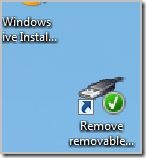
Create a shortcut of "Remove removable storage device safely" on your desktop

ts by ts
October 5, 2009
in Featured, Tips & Tricks, Windows
A A
0


shortcut to removable device on desktop

You got an idle pen drive of tonnes of MB always empty- you got to utilize it,make your pen drive as an extra RAM.

This is surely going to help me a lot mainly by two pros. My Transcend JetFlash JF V10 8GB pen drive is my ReadyBoost device and my all-in-one backup storage device. And this is true I need it every time on-the-go and while before the high definition screen. So obviously Removing this device safely is going to torture me, if this post doesn’t imply.

Simply follow these very simple steps:

  • Open a new shortcut wizard in the desktop (or somewhere u want)
  • Enter the path
    %windir%System32rundll32.exe shell32.dll,Control_RunDLL hotplug.dll (for a screenshot on how to enter the path click here)
  • Opt your own icon if you like.

Nextime onward do not hassle yourself for removing safely your loving removable disk. This is a system 32 dll application and runs only on Windows Vista, Removes removable storage device safely.

Related Post

Syuchatar in Regional Context: A Policy Commentary on Sovereign AI Compute

Nepal’s Sovereign AI Compute Center at Syuchatar: A Technical Explainer

Nepal Budget 2083/84: A Comprehensive Reference on the Tech, IT and Innovation Provisions

Nepal Digital Budget 2082/83: AI, Startups, 5G, and the Tech Roadmap Ahead

Originally  How to create a shortcut to remove device safely/ eject device on desktop from ekendra’s blog.
Tags: Removable devicesTips & Tricks
Share212Tweet133Send
Previous Post

Windows 7 gets supports by Lenovo's enhanced experience

Next Post

Get the gadget you want in Kathmandu

Related Posts

Illustrating Sovereign AI Compute in Nepal Syuchatar with circuitary
Featured

Syuchatar in Regional Context: A Policy Commentary on Sovereign AI Compute

This article is Part 2B of a TechSansar series on the FY 2083/84 Nepalese federal budget. Part 2A set out...

by E Lamsal
May 31, 2026
Technical explainer on Nepal's announced Sovereign AI Compute Center at Syuchatar. What Budget 2083/84 specified, what it didn't, and the four design questions that decide its outcome.
Featured

Nepal’s Sovereign AI Compute Center at Syuchatar: A Technical Explainer

This article is Part 2A of a TechSansar series on the FY 2083/84 federal budget. Part 1 set out the...

by E Lamsal
May 30, 2026

Recent News

Illustrating Sovereign AI Compute in Nepal Syuchatar with circuitary

Syuchatar in Regional Context: A Policy Commentary on Sovereign AI Compute

May 31, 2026
Technical explainer on Nepal's announced Sovereign AI Compute Center at Syuchatar. What Budget 2083/84 specified, what it didn't, and the four design questions that decide its outcome.

Nepal’s Sovereign AI Compute Center at Syuchatar: A Technical Explainer

May 30, 2026
Nepal budget 2083-84 on IT

Nepal Budget 2083/84: A Comprehensive Reference on the Tech, IT and Innovation Provisions

May 30, 2026
Success Story of a GovTech

Nepal’s Department of IT Saved Rs 98 Crore with Centralized A2P Messaging: A GovTech Success Story

December 31, 2025
Hostinger
  • News
  • Tech
  • Event
Generate free QR Codes with QRSansar

TechSansar.com, ICT For Media Pvt Ltd, Regd #249079/077/078, VAT #609868175.
By continuing to use this site, you agree to our cookies and privacy policies.
Here is our Do Not Track (DNT) Guide. Hosted on a VPS and uses this free PDF tool. You can also subscribe to our newsletter.
Creating tech contents for the b̶o̶t̶s̶ humans since 2009 • Team TechSansar • ICT4M with ❤ from Nepal

Welcome Back!

Login to your account below

Forgotten Password? Sign Up

Create New Account!

Fill the forms below to register

All fields are required. Log In

Retrieve your password

Please enter your username or email address to reset your password.

Log In
No Result
View All Result
  • Home
  • Shop peripherals
  • Buy softwares
  • Top websites
  • Contact us

TechSansar.com, ICT For Media Pvt Ltd, Regd #249079/077/078, VAT #609868175.
By continuing to use this site, you agree to our cookies and privacy policies.
Here is our Do Not Track (DNT) Guide. Hosted on a VPS and uses this free PDF tool. You can also subscribe to our newsletter.
Creating tech contents for the b̶o̶t̶s̶ humans since 2009 • Team TechSansar • ICT4M with ❤ from Nepal