• Login
  • Register
Tuesday, June 9, 2026
Generate QR Codes
Free PDF Tools
Free Web Audit 360
TechSansar.com
  • Services
  • Top Posts
  • Nepali IT
  • Startups
  • Tech News
  • Categories
    • News
      • Tech
No Result
View All Result
TechSansar.com
  • Services
  • Top Posts
  • Nepali IT
  • Startups
  • Tech News
  • Categories
    • News
      • Tech
No Result
View All Result
TechSansar.com

Windows 10 is almost here, reserve your free license today.

ts by ts
July 13, 2015
in Tech News, Windows
A A
0
Reserve Windows 10 upgrade today

Reserve Windows 10 upgrade today

Related Post

Understanding the TikTok Ban in Nepal: Context, Implications, and the Global Digital Landscape #TikTokBanNepal

Apply now for the $25,000 UNESCO Prize for Your Education Technology Solution

Daraz announces the biggest sale of the year – Up to 80% off, mega vouchers up to 11,111 & more

Great! Nagarik App now supports Vehicle Tax and Bluebook Info #NagarikApp

Microsoft has 5 million Windows 10 beta testers aka Insiders. Microsoft details Windows 10 roll out – millions of reservation has already been made – rolling from Windows 10 Technical Previews to the recent Windows 10 Insiders. However, current Windows 10 testers will get auto final Windows 10 version on July 29 (also called code access), and volume licenses will get full Windows 10 editions on August 1st. The rest, reservees, will get the roll out so so. This is your chance to reserve your Windows 10 license for free today from existing Windows 7 or 8 OS machine.

Reserving your copy of Windows 10 initial steps

Reserve Windows 10 free Upgrade

This is the tutorial to reserve your Windows 10 free Upgrade. Listed below are step by step screenshots to help you get Windows 10 offer. Ensure that you have all Windows updates checked and installed before proceeding. If you have Windows 8, then ensure you have the latest update edition ie Windows 8.1 Spring Update.

On the right side of your taskbar, click that little white Windows icon that reads “Get Windows 10”. You will trigger a self-guided Window “Get Windows 10” to tell you “How this free upgrade works”.

Users need to Reserve – Reserve your FREE upgrade to Windows 10. This free Windows 10 reserve will download once available for your. Worry not you can cancel this reservation at any time should you change your mind. Windows 10 free download is full version of Windows 10, not a trial and is 3 GB of download size.

Windows 10 upgrade reservation wizard

Windows 10 upgrade reservation wizard gives you some insight of the Windows 10. Besides how free Windows 10 upgrade works, you can also learn Windows 10 designed for speed, amazing new features, apps, games and finally getting PC readied.

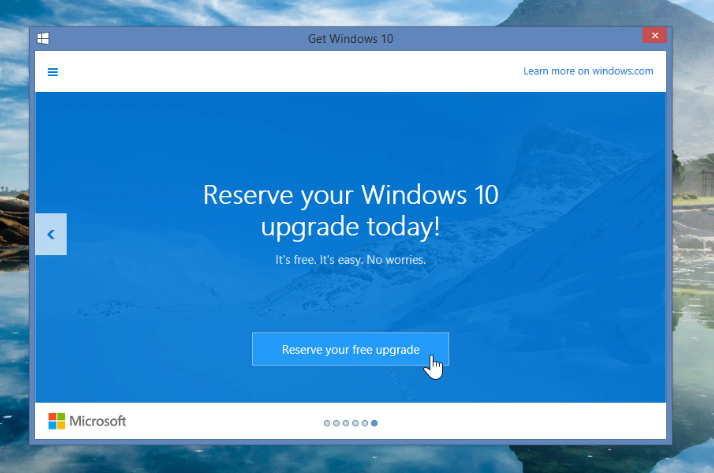
Reserve Windows 10 upgrade today

On the last screen of the wizard, click “Reserve your free upgrade” in order to reserve your Windows 10 upgrade. It’s free, easy and no worries – Microsoft says.

Great Windows 10 is reserved confirmation

You can opt to get confirmation email from Microsoft regarding the availability of the Windows 10 you just reserved. As said earlier, the free Windows 10 upgrade is rolled out on priority basis from Insiders to enterprises to the normal users.

Windows 10 upgrade reserved Control panel confirmation
After your Windows 10 free upgrade is reserved, this can also be confirmed from the Control Panel > All Control Panel Items > Windows Update. When the Windows 10 upgrade is ready to be downloaded and installed on your PC, you will be notified from the notification bar in the taskbar.
Read here the top features of Windows 10.
Tags: MicrosoftTips & TricksWindows 10
Share212Tweet133Send
Previous Post

[How to] Type Nepali Unicode easily on your PC or Web – Google Input Tools Review

Next Post

[How to] Install Insiders Preview to Upgrade Windows7 or 8 to Free Windows 10 License

Related Posts

TikTok ban in Nepal over issues of social harmony
Social Networking

Understanding the TikTok Ban in Nepal: Context, Implications, and the Global Digital Landscape #TikTokBanNepal

In a significant move reflecting the complex interplay of technology, security, and social values, the government of Nepal decided on...

by tsGeek
July 24, 2024
Technology in Education Illustration
Tech News

Apply now for the $25,000 UNESCO Prize for Your Education Technology Solution

If you have an education technology solution that uses digital technology to improve education and provide equal access to quality...

by tsGeek
July 24, 2024

Recent News

Illustrating Sovereign AI Compute in Nepal Syuchatar with circuitary

Syuchatar in Regional Context: A Policy Commentary on Sovereign AI Compute

May 31, 2026
Technical explainer on Nepal's announced Sovereign AI Compute Center at Syuchatar. What Budget 2083/84 specified, what it didn't, and the four design questions that decide its outcome.

Nepal’s Sovereign AI Compute Center at Syuchatar: A Technical Explainer

May 30, 2026
Nepal budget 2083-84 on IT

Nepal Budget 2083/84: A Comprehensive Reference on the Tech, IT and Innovation Provisions

May 30, 2026
Success Story of a GovTech

Nepal’s Department of IT Saved Rs 98 Crore with Centralized A2P Messaging: A GovTech Success Story

December 31, 2025
Hostinger
  • News
  • Tech
  • Event
Generate free QR Codes with QRSansar

TechSansar.com, ICT For Media Pvt Ltd, Regd #249079/077/078, VAT #609868175.
By continuing to use this site, you agree to our cookies and privacy policies.
Here is our Do Not Track (DNT) Guide. Hosted on a VPS and uses this free PDF tool. You can also subscribe to our newsletter.
Creating tech contents for the b̶o̶t̶s̶ humans since 2009 • Team TechSansar • ICT4M with ❤ from Nepal

Welcome Back!

Login to your account below

Forgotten Password? Sign Up

Create New Account!

Fill the forms below to register

All fields are required. Log In

Retrieve your password

Please enter your username or email address to reset your password.

Log In
No Result
View All Result
  • Home
  • Shop peripherals
  • Buy softwares
  • Top websites
  • Contact us

TechSansar.com, ICT For Media Pvt Ltd, Regd #249079/077/078, VAT #609868175.
By continuing to use this site, you agree to our cookies and privacy policies.
Here is our Do Not Track (DNT) Guide. Hosted on a VPS and uses this free PDF tool. You can also subscribe to our newsletter.
Creating tech contents for the b̶o̶t̶s̶ humans since 2009 • Team TechSansar • ICT4M with ❤ from Nepal