

• Login
  • Register
Sunday, July 19, 2026
Generate QR Codes
Free PDF Tools
Free Web Audit 360
TechSansar.com
  • Services
  • Top Posts
  • Nepali IT
  • Startups
  • Tech News
  • Categories
    • News
      • Tech
No Result
View All Result
TechSansar.com
  • Services
  • Top Posts
  • Nepali IT
  • Startups
  • Tech News
  • Categories
    • News
      • Tech
No Result
View All Result
TechSansar.com

How to show hidden files and folders in Windows

ts by ts
January 4, 2010
in Default
A A
0

Related Post

Complete List Of SLC Result 2066

Working Hard is NOT enough!

Verizon iPhone to be released soon

Facebook fantasies – errors and rumors with Facebook

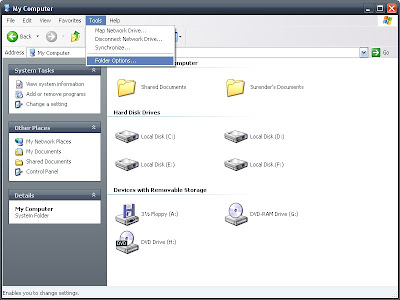
In windows the system files and folders are hidden in default. To show the system / user hidden files and folders in windows explorer. Try this steps
1. Open Tools then click on Folder Options
2009 12 11+13+24+28
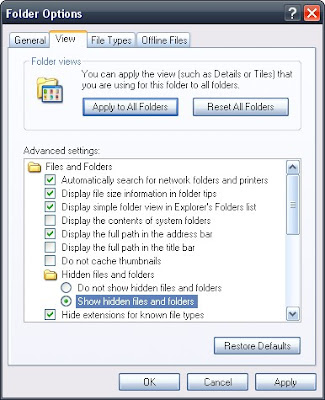
2. Click on view tab and choose Show hidden files and folders
2009 12 11+13+24+39
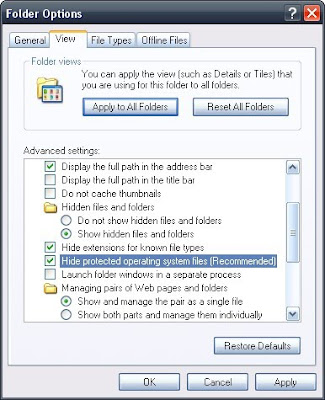
3. To show system files and folders uncheck Hide protected operating system files
2009 12 11+13+28+10
4. After that a message is appeared, click to Yes

2009 12 11+13+25+10

5. Click to apply and Ok to save this setting. Check whether the hidden files and folders seeing or not.

Share212Tweet133Send
Previous Post

Installing Husband – a Technical Humor

Next Post

How to disable the autorun of CD/DVD

Related Posts

Default

Complete List Of SLC Result 2066

by ts
July 3, 2010
Default

Working Hard is NOT enough!

Dear visitor, you may have known that our site was down recently. TechSansar.com experienced a down service twice this month....

by ts
June 14, 2010

Recent News

Gen Z Protest Kathmandu 2025

July 4, 2026
The Launch That Moved Syuchatar: YetiCloud.AI and the Night Nepal’s Compute Policy Went Public

The Launch That Moved Syuchatar: YetiCloud.AI and the Night Nepal’s Compute Policy Went Public

July 4, 2026
Illustrating Sovereign AI Compute in Nepal Syuchatar with circuitary

Syuchatar in Regional Context: A Policy Commentary on Sovereign AI Compute

May 31, 2026
Technical explainer on Nepal's announced Sovereign AI Compute Center at Syuchatar. What Budget 2083/84 specified, what it didn't, and the four design questions that decide its outcome.

Nepal’s Sovereign AI Compute Center at Syuchatar: A Technical Explainer

May 30, 2026
Hostinger
  • News
  • Tech
  • Event
Generate free QR Codes with QRSansar

TechSansar.com, ICT For Media Pvt Ltd, Regd #249079/077/078, VAT #609868175.
By continuing to use this site, you agree to our cookies and privacy policies.
Here is our Do Not Track (DNT) Guide. Hosted on a VPS and uses this free PDF tool. You can also subscribe to our newsletter.
Creating tech contents for the b̶o̶t̶s̶ humans since 2009 • Team TechSansar • ICT4M with ❤ from Nepal

Welcome Back!

Login to your account below

Forgotten Password? Sign Up

Create New Account!

Fill the forms below to register

All fields are required. Log In

Retrieve your password

Please enter your username or email address to reset your password.

Log In
No Result
View All Result
  • Home page
  • Shop peripherals
  • Buy software
  • Featured articles
  • My account

TechSansar.com, ICT For Media Pvt Ltd, Regd #249079/077/078, VAT #609868175.
By continuing to use this site, you agree to our cookies and privacy policies.
Here is our Do Not Track (DNT) Guide. Hosted on a VPS and uses this free PDF tool. You can also subscribe to our newsletter.
Creating tech contents for the b̶o̶t̶s̶ humans since 2009 • Team TechSansar • ICT4M with ❤ from Nepal


