 Well now, it’s high time some people are thinking that Google is not going a sort of justice with their Buzz service. For most people it might be embarrassing that your Gmail account is automatically activated for Google’s social networking Buzz. Google has been experiencing lots of comments about this. In the mean time ,there is a way to completely disable Google Buzz and delete your Google Profile.
Go to your Google profile page, ensure that you are logged into Google accounts with your Gmail id.
Use this link to edit your Google profile, http://www.google.com/profiles/me/editprofile
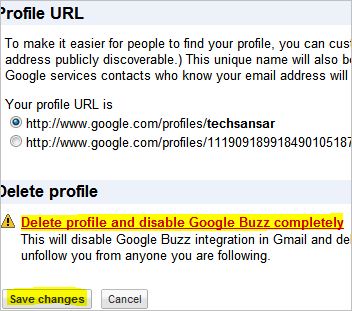
The Profile URL is of the format: http://www.google.com/profiles/techsansar or http://www.google.com/profiles/111909189918490105187
 Google says: Profile URL is to make it easier for people to find your profile, you can customize your URL with your Google email username. (Note this can make your Google email address publicly discoverable.) This unique name will also be used in other links to your content on Google. To help others discover your profile, in some Google services contacts who know your email address will see a link to your profile.
Click on Deleting Google profile and disabling Google Buzz completely
This will disable Google Buzz integration in Gmail and delete your Google profile and Buzz posts. It will also disconnect any connected sites and unfollow you from anyone you are following.
Don’t worry even if your happen to click delete my Google profile and Buzz, there is another step before doing that – it will ask you one last chance “Are you sure you want to delete your Google profile and Google Buzz posts?”
 On the mean time if you want to make your appearance private and limited to only a circle of your friend, you can do this in Google Buzz, simply uncheck the boxes that says about your findings in the profile page (top right) –
Display my full name so I can be found in search (also required to use Google Buzz and Latitude)
Allow people to contact me (without showing my email address)
Display the list of people I’m following and people following me
Hope this article will help those who don’t want their Google Buzz to be public, or those who want to completely disable Buzz
|
To make it easier for people to find your profile, you can customize your URL with your Google email username. (Note this can make your Google email address publicly discoverable.) This unique name will also be used in other links to your content on Google. To help others discover your profile, in some Google services contacts who know your email address will see a link to your profile.Learn more
Your profile URL is
|
 Delete profile and disable Google Buzz completely Delete profile and disable Google Buzz completely
This will disable Google Buzz integration in Gmail and delete your Google profile and Buzz posts. It will also disconnect any connected sites and unfollow you from anyone you are following.
|