


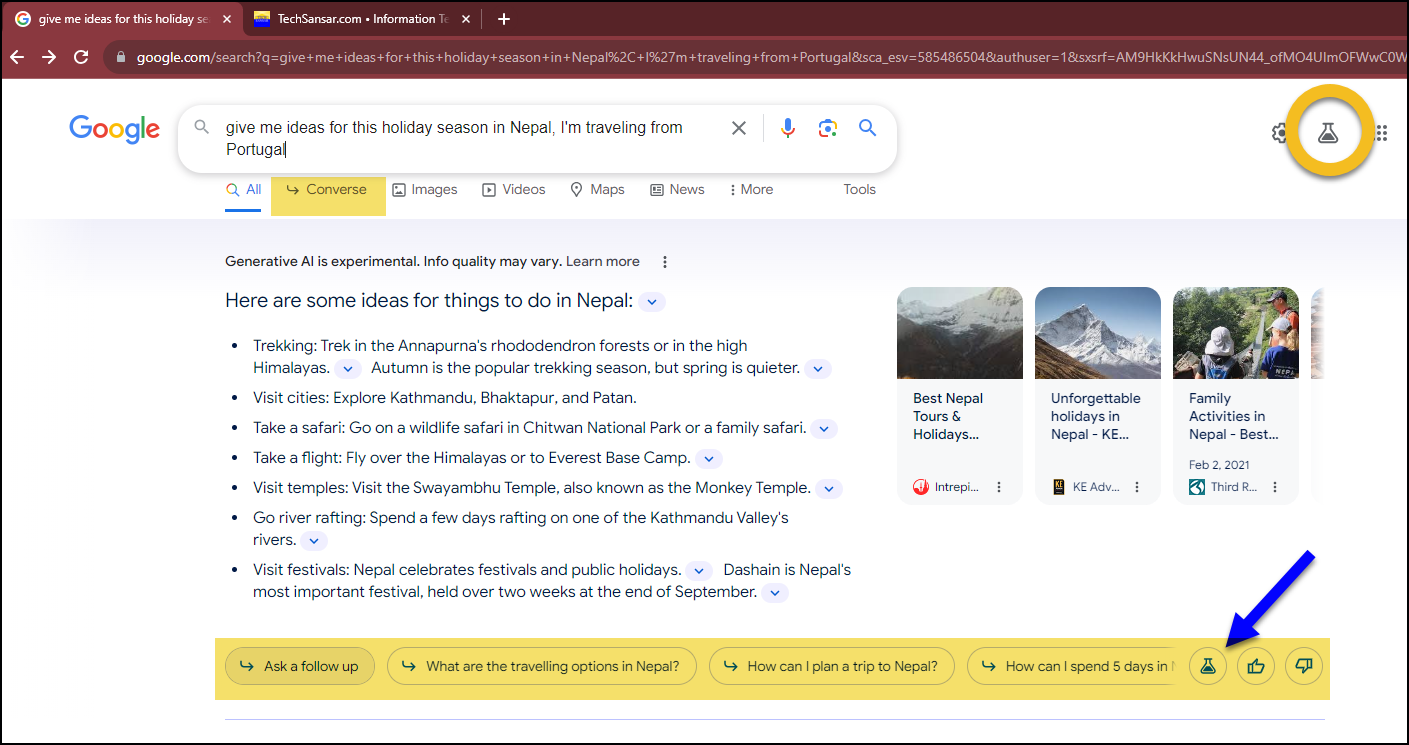
Tech companies are up to bringing some sort of Generative Artificial Intelligence (AI) to their services – Google, while their Bard is still in experiment, and their Gemini, a different AI project, is coming with their experimental AI-embedded Google Search feature. Search Labs experiments by Google Search is probably for everyone interested in finding their search responses quickly and in more structured text. When you search Google with Search Generative Experience (SGE), you get AI-powered answers with helpful information and can ask follow-up questions – as opposed to what you get with Google’s list of top sites.
While Google’s Search Generative experience may be compared with Copilot with Bing (earlier Bing Chat), they are two different with user’s AGI responses. Google SGE primarily focuses on providing summaries and insights from existing web sources, while Copilot with Bing Chat engages in open-ended conversations and generative creative text formats.
Google Search’s Generative AI response is a new feature that uses machine learning to generate more comprehensive and informative answers to your search queries. It is based on a technique called generative pre-training, which involves training a large language model (LLM) on a massive dataset of text and code. LLMs are a type of artificial intelligence that can learn to generate human-quality text.
You can try generative AI in Google search by turning on, SGE, from search labs feature at the top right of your Google search page. You must be logged in to use this already great Google Search powered by AI. Go turn on your AI powered Google search here: https://labs.google.com/search

Google’s generative pre-training process involves two main steps:
- Training on a massive dataset of text and code: The LLM is trained on a huge dataset of text and code, which includes books, articles, code repositories, and other sources of text. This dataset provides the LLM with a rich understanding of the world and how language works.
- Fine-tuning on a specific task: Once the LLM has been trained on the massive dataset, it is fine-tuned on a specific job, such as generating search results. This fine-tuning process involves preparing the LLM on a smaller dataset of text specific to the task at hand.
Google Search’s Generative AI response uses a variety of techniques to generate its responses, including:
- Natural language understanding (NLU): NLU is used to understand the meaning of your search query. This involves breaking down the query into its constituent parts and identifying the key concepts and relationships between them.
- Natural language generation (NLG): NLG is used to generate a response that is both informative and engaging. This involves using the LLM’s knowledge of language to generate a text that is grammatically correct, fluent, and relevant to the query.
- Knowledge graph: Google Search’s knowledge graph is a vast database of information about people, places, things, and events. This knowledge graph is used to provide context for the LLM’s responses and to ensure that they are accurate and up-to-date.
Generative AI is a powerful new technology that has the potential to revolutionize the way we search for information online. As the technology continues to improve, we can expect to see even more innovative and helpful applications of Generative AI in Search.

Here are some additional technological concepts related to Generative AI:
Transformer: The transformer is a neural network architecture that has been shown to be very effective for natural language processing tasks. The transformer is used in the LLM that powers Google Search’s Generative AI response.
Self-attention: Self-attention is a mechanism that allows the transformer to focus on the most relevant parts of the input text. This is important for generating coherent and informative responses.
Beam search: Beam search is a search algorithm that is used to find the most likely sequences of words given a prompt. This algorithm is used in the LLM to generate its responses.
You can learn more on Google’s Generative AI for Search at Google Labs here.
If you are an avid Google user, and searching with Google is what you do multiple times a day (and probably do not have access to ChatGPT Plus subscription), Google Search Generative Experience is what you need today to focus on traditional search tasks and get things quickly. We assume Google will in near future integrate AI capabilities to their search engine by default, until then you should get acquainted with this Google’s Search Generative experience.









Comments 2