• Login
  • Register
Sunday, July 19, 2026
Generate QR Codes
Free PDF Tools
Free Web Audit 360
TechSansar.com
  • Services
  • Top Posts
  • Nepali IT
  • Startups
  • Tech News
  • Categories
    • News
      • Tech
No Result
View All Result
TechSansar.com
  • Services
  • Top Posts
  • Nepali IT
  • Startups
  • Tech News
  • Categories
    • News
      • Tech
No Result
View All Result
TechSansar.com

Facebook & Twitter via SMS Now in Nepal

ts by ts
February 25, 2011
in SMS & related
A A
0

FB My first Facebook Status through SMS - Sparrow SMSFinally, the wait is over for us Nepalese. The real fun and excite of updating your Facebook message and Tweets by sending an SMS is in our reach. These are, btw, not official Facebook and Twitter numbers or services which have been in use since long in many other countries.

Sparrow SMS, power of Text, has brought Facebook via SMS and Twitter via SMS connectivity among the Nepalese Mobile Telephone Operators. Sparrow SMS is the product of Janaki Technology Pvt Ltd, an outsourcing company based in Kathmandu.

What is Sparrow SMS? Sparrow SMS is a complete SMS Service powered by SMSFOX engine capable of running any type of SMS campaign and everything possible in Nepal via SMS (as written in their home page.)

How to update Facebook status via SMS in NTC or NCell Mobile?facebook via sms

First, connect SparrowSMS to your Facebook account (click here to do so) and grant permissions for SparrowSMS to publish to your wall. We assume SparrowSMS will use this feature only for the purpose of posting our SMS sent status on FB Wall.
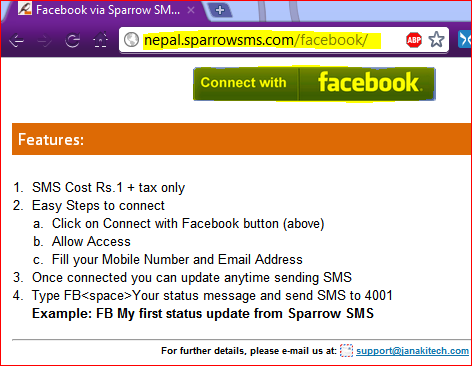
connect with facebook

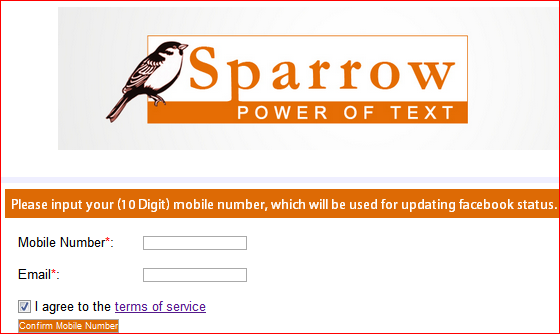
Enter your mobile number (NTC or NCell) and your email address.

To update Facebook status via SMS

Type FB <space> your-status-message-to-fb-wall; then SEND to 4001
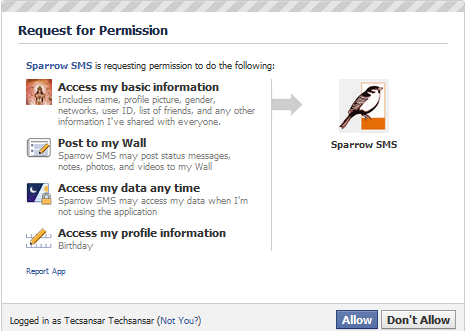
sparrow sms fb connect

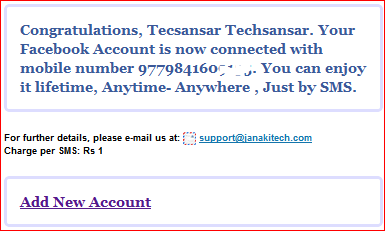
fb connected

fb sms 2

Related Post

Send free Local and International SMS from Mobile using JaxtrSMS

Ncell's new ISD plan

Ncell launches 3G services

Ways to Get SLC 2066 Result Instantly

Charge per SMS is Re 1 + tax ie Rs 1.24

According their website, this service has been in active since October 1, 2010. Read SparrowSMS privacy policy and Terms of Conditions.


How to send Tweets or update Twitter via NTC or NCell SMS?twitter via sms

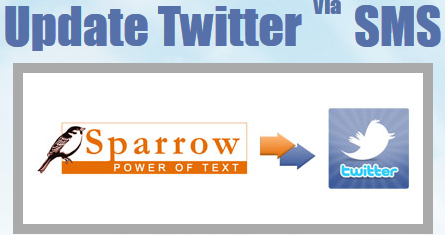
update twitter via sms sparrow sms

To update Twitter via SMS

Type TW <space> your-max-140-character-tweet; then SEND to 4001

However, you need to authorize Sparrow SMS to access (read/write) your Twitter account. This means Sparrow SMS is not directly associated with Twitter, they will perform a two-step action to update your Tweets. We could not find any apps but the authentication permission to Sparrow SMS for allowing to update Tweets like in Facebook (see the steps in screenshot.)

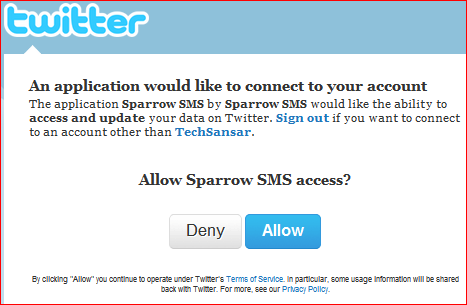
sparrow to twitter connection

allow sparrow sms

Sadly, our Twitter verification failed and were taken to this page https://nepal.sparrowsms.com/index.php/sms_twitter/callback


Tags: FacebookTech NewsTips & TricksTutorialsTwitter
Share212Tweet133Send
Previous Post

Setting up Exchange ActiveSync on your Mobile Phone

Next Post

Closing Windows Explorer with hidden trick in Windows 7

Related Posts

Products

Send free Local and International SMS from Mobile using JaxtrSMS

You might be using internet/web to SMS from various websites (we even have published a couple of articles on this),...

by ts
December 4, 2011
SMS & related

Ncell's new ISD plan

Ncell has extended its ISD services up to 22 countries. There are now two sets of tariff to make international...

by ts
September 21, 2010

Recent News

Gen Z Protest Kathmandu 2025

July 4, 2026
The Launch That Moved Syuchatar: YetiCloud.AI and the Night Nepal’s Compute Policy Went Public

The Launch That Moved Syuchatar: YetiCloud.AI and the Night Nepal’s Compute Policy Went Public

July 4, 2026
Illustrating Sovereign AI Compute in Nepal Syuchatar with circuitary

Syuchatar in Regional Context: A Policy Commentary on Sovereign AI Compute

May 31, 2026
Technical explainer on Nepal's announced Sovereign AI Compute Center at Syuchatar. What Budget 2083/84 specified, what it didn't, and the four design questions that decide its outcome.

Nepal’s Sovereign AI Compute Center at Syuchatar: A Technical Explainer

May 30, 2026
Hostinger
  • News
  • Tech
  • Event
Generate free QR Codes with QRSansar

TechSansar.com, ICT For Media Pvt Ltd, Regd #249079/077/078, VAT #609868175.
By continuing to use this site, you agree to our cookies and privacy policies.
Here is our Do Not Track (DNT) Guide. Hosted on a VPS and uses this free PDF tool. You can also subscribe to our newsletter.
Creating tech contents for the b̶o̶t̶s̶ humans since 2009 • Team TechSansar • ICT4M with ❤ from Nepal

Welcome Back!

Login to your account below

Forgotten Password? Sign Up

Create New Account!

Fill the forms below to register

All fields are required. Log In

Retrieve your password

Please enter your username or email address to reset your password.

Log In
No Result
View All Result
  • Home page
  • Shop peripherals
  • Buy software
  • Featured articles
  • My account

TechSansar.com, ICT For Media Pvt Ltd, Regd #249079/077/078, VAT #609868175.
By continuing to use this site, you agree to our cookies and privacy policies.
Here is our Do Not Track (DNT) Guide. Hosted on a VPS and uses this free PDF tool. You can also subscribe to our newsletter.
Creating tech contents for the b̶o̶t̶s̶ humans since 2009 • Team TechSansar • ICT4M with ❤ from Nepal