


• Login
  • Register
Saturday, July 18, 2026
Generate QR Codes
Free PDF Tools
Free Web Audit 360
TechSansar.com
  • Services
  • Top Posts
  • Nepali IT
  • Startups
  • Tech News
  • Categories
    • News
      • Tech
No Result
View All Result
TechSansar.com
  • Services
  • Top Posts
  • Nepali IT
  • Startups
  • Tech News
  • Categories
    • News
      • Tech
No Result
View All Result
TechSansar.com

[How to] Use all new Google Contacts, how to revert back to classical Contacts mode.

ts by ts
June 20, 2015
in Tips & Tricks
A A
0
Google Contacts Preview-All new contact management

Google Contacts Preview-All new contact management

Related Post

6 simple yet effect ways to speed up your Windows 10 computer

12 productivity keyboard shortcuts for Microsoft Teams

Create Watermark of image using PHP

Test Internet Speed using Python

As a part of User Interface (UI) improvement, Google has recently public their all new Google Contacts. Still in beta or preview, it’s called Google Contacts Preview and features lot of features with simplicity and sleek UI than the legacy mode of the Google Contacts. Users are already switched automatically to the new Contacts dashboard, if you experience the changes for Google Contacts here: https://contacts.google.com/preview/all.

Google Contacts Preview-All new contact management

With new Contacts preview it is easier to merge duplicate contacts and more contact information in one place allowing manual input to the contact cards.

How to import, export, or restore contacts in Google Contacts Preview!

However, Google Contacts Preview doesn’t allow import/export/restore yet, feature limited but enhanced UI. Hence, only troubleshooting you can work around to fix is to switch back to classical Google Contacts mode if you want to import export your Google contacts. Legacy mode of Google Contacts is available at https://www.google.com/contacts/u/0/?cplus=0#contacts.

  1. Go to the old Google Contacts
  2. From the More menu, click Import/Export/Restore and upload/download your file.
  3. Visit back to new Contacts preview window and refresh your browser
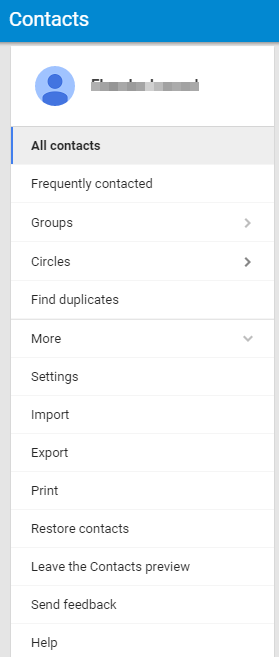
Google Contacts preview dashboard

How to switch back to old Google Contacts!

On your new Google Contacts preview dashboard’s left-hand tab, click more and then click “Leave the Contacts Preview”. If you want to try back Contacts preview again from the classical Contacts, just click “Try Contacts Preview.”
For those Androiders and iOS users (plus others) who use Google contacts as default contact management app or system on their smartphones and tablet, this new change has no effect. As Google Contacts Preview has brought new changes only to the web users.
Google Contacts Preview is not yet available for Google Apps for Work users. Contacts preview is the new way to view and edit your contacts on your computer. Get FAQ: Contacts Preview from Google itself.
Tags: ElectronicsGoogleSupport
Share212Tweet133Send
Previous Post

टेलिकमको एडिएसएल इन्टरनेट स्लो छ या डिस्कनेक्ट भैरहन्छ ? यसो गर्नुहोस्

Next Post

Windows 10 brings new features including Microsoft Edge – the new Internet Browser

Related Posts

Speed up pc
How To

6 simple yet effect ways to speed up your Windows 10 computer

With the latest update or with Microsoft Windows in general, your pc might run slow over the time of gradual...

by TechSansar Editor
February 2, 2021
Top 12 Microsoft Teams Keyboard shortcuts

12 productivity keyboard shortcuts for Microsoft Teams

With Microsoft Teams on your PC, Mac or mobile device, we can achieve a near perfect remote working scenario with...

by TechSansar Editor
December 6, 2025

Recent News

Gen Z Protest Kathmandu 2025

July 4, 2026
The Launch That Moved Syuchatar: YetiCloud.AI and the Night Nepal’s Compute Policy Went Public

The Launch That Moved Syuchatar: YetiCloud.AI and the Night Nepal’s Compute Policy Went Public

July 4, 2026
Illustrating Sovereign AI Compute in Nepal Syuchatar with circuitary

Syuchatar in Regional Context: A Policy Commentary on Sovereign AI Compute

May 31, 2026
Technical explainer on Nepal's announced Sovereign AI Compute Center at Syuchatar. What Budget 2083/84 specified, what it didn't, and the four design questions that decide its outcome.

Nepal’s Sovereign AI Compute Center at Syuchatar: A Technical Explainer

May 30, 2026
Hostinger
  • News
  • Tech
  • Event
Generate free QR Codes with QRSansar

TechSansar.com, ICT For Media Pvt Ltd, Regd #249079/077/078, VAT #609868175.
By continuing to use this site, you agree to our cookies and privacy policies.
Here is our Do Not Track (DNT) Guide. Hosted on a VPS and uses this free PDF tool. You can also subscribe to our newsletter.
Creating tech contents for the b̶o̶t̶s̶ humans since 2009 • Team TechSansar • ICT4M with ❤ from Nepal

Welcome Back!

Login to your account below

Forgotten Password? Sign Up

Create New Account!

Fill the forms below to register

All fields are required. Log In

Retrieve your password

Please enter your username or email address to reset your password.

Log In
No Result
View All Result
  • Home page
  • Shop peripherals
  • Buy software
  • Featured articles
  • My account

TechSansar.com, ICT For Media Pvt Ltd, Regd #249079/077/078, VAT #609868175.
By continuing to use this site, you agree to our cookies and privacy policies.
Here is our Do Not Track (DNT) Guide. Hosted on a VPS and uses this free PDF tool. You can also subscribe to our newsletter.
Creating tech contents for the b̶o̶t̶s̶ humans since 2009 • Team TechSansar • ICT4M with ❤ from Nepal



