In a world obsessed with “smart” technology, it’s easy to get caught up in the addition of new features — and in the process, lose sight of what people really need. When we create new devices at Lenovo, we ensure they not only have the ability to adapt to users, no matter where they are, or what they’re doing, but also are designed and engineered to deliver smart, convenient, and reliable benefits. We call this philosophy “Foundational Engineering.”
Imagine taking a conference call in a coffee shop complete with the clanking of coffee pots, conversation from adjacent tables and, of course, competition for personal space. Someone walks past and trips over your power cable. Your laptop crashes to the floor, along with your large cappuccino. Here, ThinkPad engineering comes into its own. With all day battery life, you don’t have to plug the system in, and it is engineered and designed to survive the fall anyway. Whether you want to work or play, ThinkPad with foundational engineering will adapt to you and protect you from the rigors of modern daily life.

Engineering Takes Dedication
Optimizing and refining a ThinkPad involves a significant amount of engineering design — including much trial and error — before coalescing into a product that exceeds stringent quality and usability testing methods.
Engineering and product development don’t happen in a vacuum. Engineers work hand in hand with designers, customer insights, and user experience experts to enhance products and create new innovations for the best user experience. “We talk to thousands of customers on an annual basis,” says Jerry Paradise, vice president, Lenovo Intelligent Devices Group’s Commercial Product Portfolio. “Briefings, councils, forums [all help us] explore ways to create valuable dialogues for the customer insights and user experience teams to take to engineering. Throughout each product cycle, there is a constant process to identify user pain points and solutions. The engineering team at Lenovo takes pride in being able to personify the system it is working on, projecting how the features it’s adding will create value for end-users.”
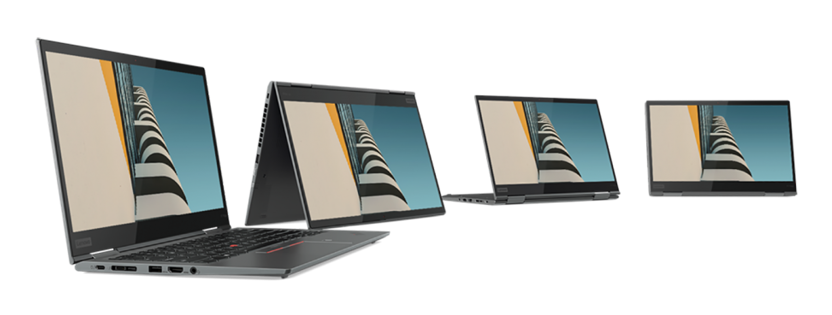
This year, Lenovo is adding a new material to the ThinkPad manufacturing process with the implementation of aluminum on the ThinkPad X1 Yoga. “Our customers highlighted a significant desire to have a metal ThinkPad,” says Paradise. “For the longest time, ThinkPad has been synonymous with the timeless black color, but in listening to customers, there were suggestions that we needed to embrace a new generation’s desire for new designs.”

We have been studying different colors, materials, and finishes for years and had suspected that early aluminum laptops would not have passed our stringent ThinkPad durability tests. While aluminum is a strong and durable material, it doesn’t necessarily lend itself to the build of a thin and light laptop that meets our quality criteria. For the ThinkPad line, this placed a focus on using the right material in the right place. “In some areas of the system such as corners, you want durability, compared to other areas where you need wireless signals to penetrate,” Paradise adds. “While we’re not the first to market with an aluminum laptop — this was a no-compromise situation — we needed to consider the elements of what makes a ThinkPad a ThinkPad.”
Making it thinner to meet our own weight requirements presents major design challenges, in particular on corners and edges. We tackled these head-ons with our engineering team. “Although the new ThinkPad X1 Yoga is the fourth generation of the model, from an engineering perspective it is more like a first-generation aluminum model,” says Paradise. “We had to go back to the foundational principles of ThinkPad engineering in order to establish what would be required to ensure that the new X1 Yoga would meet our stringent testing. We take great pride in engineering every ThinkPad to be durable, reliable and serviceable with outstanding usability in as thin and light a package as we can make it. Compromising on the end-user experience is just not in our thinking.”

Because the chassis covers must be machine produced using Computer Numerical Control (CNC), and not moulded, the design process is incredibly complex. The number of advanced stress test simulations – more than 40 – is very large just to get the fundamental engineering of the corners and edges to meet the ThinkPad durability and reliability requirements. The resulting design had to balance the intricacy of CNC cutting with the time required to manufacture.
Reliability Rhymes with Usability
For 26 years, ThinkPad has been synonymous with durability. Learning from early laptop reliability issues, ThinkPad engineers have always focused on continuously improving reliability. Since the adoption of MIL-Spec testing as defined by MIL-STD 810 methods, ThinkPad continues to have leadership in the area of total methods and procedures as well as span and consistency of testing across the entire portfolio. Passing 22 different procedures, ThinkPad is one of the most reliable and durable laptops in the market today.
Reliability doesn’t end with testing and in fact, goes hand-in-hand with usability needs. Lenovo has always been focused on finding the right balance between cooling, power, battery and noise. The ThinkPad X1 Carbon and X1 Yoga leverage Intelligent Cooling — a mechanism designed to maximize ThinkPad thermal performance without compromising end-user functionality. Intelligent Cooling has three settings: “Performance,” “Balanced” and “Quiet.” Each setting is designed to match the user’s current environment. Engineers mapped out 300 different real-world scenarios of how users would use ThinkPad devices, coupled with pre-programmed intelligence to make this optimization possible. Whether your ThinkPad is open, in a bag, on a desk or on your lap, Intelligent Cooling will help to maximize the system’s processing power.

Another example of foundational engineering is the ThinkPad’s “Dust Free” fan. The fan allows for significantly fewer failures and downtime attributed to dust accumulation and keeps a ThinkPad cooler and more comfortable operating over long durations. Originally inspired by the efficiency and silence of an owl wing, Lenovo engineers have continued to improve fan performance by collecting samples of failed fans in PCs from a variety of different environments and analyzed the types of dust that had accumulated over time. That process enabled them to make a “dust test” to assess the impact of the Dust Free fan. The result is an industry-unique fan assembly that eliminates the static electricity that causes dust accumulation.
Remote Working Transforming the Modern Workplace
One hurdle of creating products that truly adapt to users, no matter where they are, is device connectivity and the ability to efficiently foster collaboration remotely. For the engineering team, this means being always on and always connected. That’s why we added a new UltraConnect Antenna design on the ThinkPad X1 Carbon and X1 Yoga. The new WWAN antenna designs allow you to have full wireless LTE performance in all modes. Leveraging nano-molding technology, engineers were able to move the antenna to the sides of the system, providing improved signal performance.
Want to use your ThinkPad for VoIP? Or maybe even as a voice assistant? Now you can. Both the X1 Carbon and X1 Yoga have full WLAN and WWAN connectivity, even when the system is closed. Four far-field, 360-degree microphones of the ThinkPad X1 Carbon and X1 Yoga drown out noise, allowing you to tune the microphones directionally or opening up to a full speaker phone to optimize your system regardless of your needs or location. Still on that call but need to get to your next meeting? You can close the lid, assured that your call will continue and the WWAN antenna design will help you stay connected for the remainder of your conference call.
Being smart is cool, but being smart and useful is more important. By implementing a user-centric approach and leveraging a deep foundational engineering heritage, Lenovo strives to create products that harness years of experience that every customer deserves. ThinkPad has built trust through a deep-rooted commitment to produce laptops that stand by a legacy of durability and functionality created twenty-six years ago. ThinkPad has been a quintessential component of the mobile computing revolution and will continue to be at the forefront of innovation.