

• Login
  • Register
Sunday, July 19, 2026
Generate QR Codes
Free PDF Tools
Free Web Audit 360
TechSansar.com
  • Services
  • Top Posts
  • Nepali IT
  • Startups
  • Tech News
  • Categories
    • News
      • Tech
No Result
View All Result
TechSansar.com
  • Services
  • Top Posts
  • Nepali IT
  • Startups
  • Tech News
  • Categories
    • News
      • Tech
No Result
View All Result
TechSansar.com

[How to] Recharge your friends mobile phones from Rynga

ts by ts
February 16, 2013
in Cell Phones, Technology
A A
0
Rynga discount VoIP provider introduces exciting Recharge a friend's phone feature

Rynga discount VoIP provider introduces exciting Recharge a friend's phone feature

Related Post

Samsung’s Flagship Phones Prices in Nepal

Mi Air Charging – Insane Revolution

Samsung Galaxy S21 Ultra vs iPhone 12 Pro Max – True Battle

Galaxy S21 and S21+ 5G – Truly Dazzling

The mobile VoIP service Rynga has launched a new service for its valued customers. Rynga is your answer if you are looking for the cheapest rates for international calls, especially to mobile phones. It’s quick and easy with the best quality you’ll find! From now on you can recharge mobile phones of friends and family all over the world with Rynga! It´s an easy and safe way to recharge prepaid phones within seconds. The money will be sent to their mobile phone directly, they don´t need to open any account!

Rynga discount VoIP provider introduces exciting Recharge a friend's phone feature
Rynga discount VoIP provider introduces exciting Recharge a friend’s phone feature
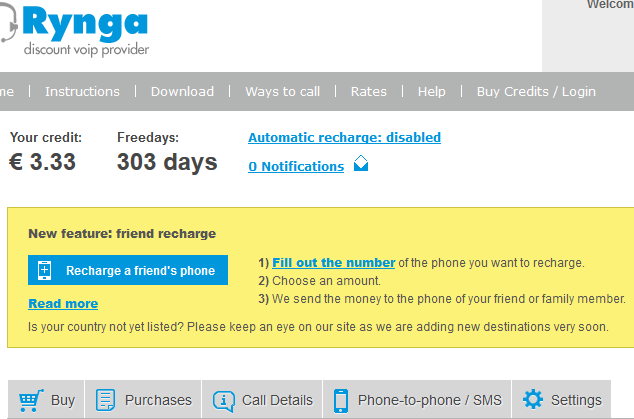
Through Rynga you can now top up the credit of your friends and family mobile phone abroad.
In a few simple steps you can send prepaid credit to their prepaid phone, they will receive it instantly and can use it right away!

Here is how to recharge Rynga remotely:

  1. Go to Friend Recharge in your Rynga account.
  2. Enter the mobile phone number of your friend , you will see the amounts available and you choose the amount you want to send.
  3. The chosen amount will be taken from your Rynga credit when your friend or family receives the money.
  4. The screen will immediately show you whether or not the transaction has succeeded. The “recipient” will have his prepaid credit topped up on his phone automatically.

An SMS message is automatically sent to notify the “recipient” of the fact that you gave him prepaid credit. This is simply helpful to recharge your friend or remote Rynga account when they don’t have a credit card or a paypal account.


Tags: Mobile PhonesNepali TechSMSVoIP
Share212Tweet133Send
Previous Post

List of Nepali Apps in App Store [iOS]

Next Post

UrStyle TV Nepal's 1st Lifestyle Web Channel [Review]

Related Posts

Samsung Flagship prices in Nepal
Cell Phones

Samsung’s Flagship Phones Prices in Nepal

Samsung offers a wide range of phones -budget, midrange, and flagship. Let's figure out, Samsung's Flagship Phones Prices in Nepal....

by TechSansar Editor
February 16, 2021
Xiaomi Air Charging
New Release

Mi Air Charging – Insane Revolution

Xiaomi has announced Mi Air Charging just weeks after Samsung's new Galaxy S21 Series.  It is a revolution of wireless charging...

by TechSansar Editor
January 30, 2021

Recent News

Gen Z Protest Kathmandu 2025

July 4, 2026
The Launch That Moved Syuchatar: YetiCloud.AI and the Night Nepal’s Compute Policy Went Public

The Launch That Moved Syuchatar: YetiCloud.AI and the Night Nepal’s Compute Policy Went Public

July 4, 2026
Illustrating Sovereign AI Compute in Nepal Syuchatar with circuitary

Syuchatar in Regional Context: A Policy Commentary on Sovereign AI Compute

May 31, 2026
Technical explainer on Nepal's announced Sovereign AI Compute Center at Syuchatar. What Budget 2083/84 specified, what it didn't, and the four design questions that decide its outcome.

Nepal’s Sovereign AI Compute Center at Syuchatar: A Technical Explainer

May 30, 2026
Hostinger
  • News
  • Tech
  • Event
Generate free QR Codes with QRSansar

TechSansar.com, ICT For Media Pvt Ltd, Regd #249079/077/078, VAT #609868175.
By continuing to use this site, you agree to our cookies and privacy policies.
Here is our Do Not Track (DNT) Guide. Hosted on a VPS and uses this free PDF tool. You can also subscribe to our newsletter.
Creating tech contents for the b̶o̶t̶s̶ humans since 2009 • Team TechSansar • ICT4M with ❤ from Nepal

Welcome Back!

Login to your account below

Forgotten Password? Sign Up

Create New Account!

Fill the forms below to register

All fields are required. Log In

Retrieve your password

Please enter your username or email address to reset your password.

Log In
No Result
View All Result
  • Home page
  • Shop peripherals
  • Buy software
  • Featured articles
  • My account

TechSansar.com, ICT For Media Pvt Ltd, Regd #249079/077/078, VAT #609868175.
By continuing to use this site, you agree to our cookies and privacy policies.
Here is our Do Not Track (DNT) Guide. Hosted on a VPS and uses this free PDF tool. You can also subscribe to our newsletter.
Creating tech contents for the b̶o̶t̶s̶ humans since 2009 • Team TechSansar • ICT4M with ❤ from Nepal



