• Login
  • Register
Sunday, July 19, 2026
Generate QR Codes
Free PDF Tools
Free Web Audit 360
TechSansar.com
  • Services
  • Top Posts
  • Nepali IT
  • Startups
  • Tech News
  • Categories
    • News
      • Tech
No Result
View All Result
TechSansar.com
  • Services
  • Top Posts
  • Nepali IT
  • Startups
  • Tech News
  • Categories
    • News
      • Tech
No Result
View All Result
TechSansar.com

How to check SEE result 2076/76 (SEE 2019)?

TechSansar Editor by TechSansar Editor
June 27, 2019
in Tech News
A A
0
FB IMG 1561628906925 1

Related Post

Understanding the TikTok Ban in Nepal: Context, Implications, and the Global Digital Landscape #TikTokBanNepal

Apply now for the $25,000 UNESCO Prize for Your Education Technology Solution

Daraz announces the biggest sale of the year – Up to 80% off, mega vouchers up to 11,111 & more

Great! Nagarik App now supports Vehicle Tax and Bluebook Info #NagarikApp

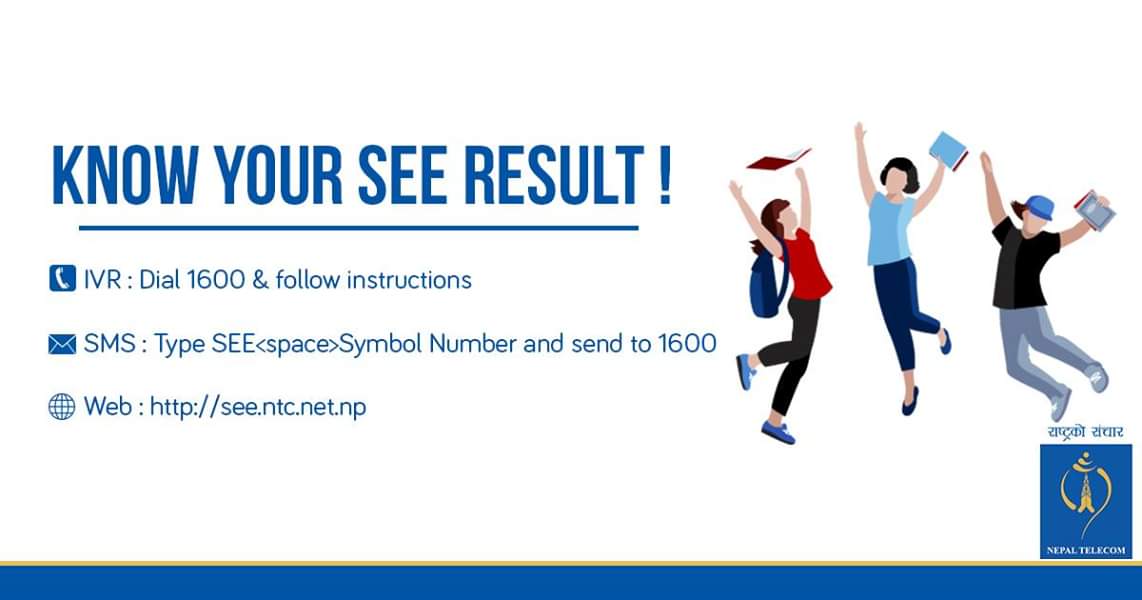
Here we present several ways to check your Secondary Education Examination (SEE) result when announced and made available by the Secondary Education Board. You can either check pass/fail or the entire marksheet of SEE.Nepal Telecom (IVR, SMS)

  1. Call 1600 from your NTC prepaid or postpaid mobile phone, supply the symbol number and get the result. Eg: SEE<space>Symbol No.
  2. Text message (SMS) your symbol number to 1600.

Nepal Telecom (website)

  1. Open Nepal Telecom website at http://see.ntc.net.np/
  2. Enter SEE symbol number (and verification data for marksheet).
  3. Screenshot or Save the result page.

fb img 15616290396127710201300505926031Ncell App (Rs 0)

  1. Open Ncell app and click on SEE result banner.
  2. Enter symbol number and check the result with GPA.
  3. No charges while checking from Ncell app.

Ncell SMS (Rs 5)Send Symbol number to 1600. For example: 1234567 or 1234567A and send to 1600Rs 5 (including taxes) per SMSThe SMS Reply message will send GPA of the student’s or sender’s mobile.Ncell SEE WebsiteYou can view your result by visiting https://see.ncell.axiata.com/ and enter your symbol number.fb img 15616293089998057900852401709055Sparrow SMSType SEE and your SEE symbol number, send SMS to 35001.

GPA Points Meaning and Percentage in SEE

SNInterval in PercentGradeDescriptionGrade Point
190 to 100A+Outstanding4.0
280 to below 90AExcellent3.6
370 to below 80B+Very Good3.2
460 to below 70BGood2.8
550 to below 60C+Satisfactory2.4
640 to below 50CAcceptable2.0
730 to below 40D+Partially Acceptable1.6
820 to below 30DInsufficient1.2
90 to below 20EVery Insufficient0.8
Tags: SEE Result
Share212Tweet133Send
Previous Post

[How to] Create an UEFI bootable USB drive or DVD for Windows 10 or 11 – Perfectly Works in 2026

Next Post

7 Easy Fixes for Slow Wi-Fi, how to improve Wi-Fi signal coverage!

Related Posts

TikTok ban in Nepal over issues of social harmony
Social Networking

Understanding the TikTok Ban in Nepal: Context, Implications, and the Global Digital Landscape #TikTokBanNepal

In a significant move reflecting the complex interplay of technology, security, and social values, the government of Nepal decided on...

by tsGeek
July 24, 2024
Technology in Education Illustration
Tech News

Apply now for the $25,000 UNESCO Prize for Your Education Technology Solution

If you have an education technology solution that uses digital technology to improve education and provide equal access to quality...

by tsGeek
July 24, 2024

Recent News

Gen Z Protest Kathmandu 2025

July 4, 2026
The Launch That Moved Syuchatar: YetiCloud.AI and the Night Nepal’s Compute Policy Went Public

The Launch That Moved Syuchatar: YetiCloud.AI and the Night Nepal’s Compute Policy Went Public

July 4, 2026
Illustrating Sovereign AI Compute in Nepal Syuchatar with circuitary

Syuchatar in Regional Context: A Policy Commentary on Sovereign AI Compute

May 31, 2026
Technical explainer on Nepal's announced Sovereign AI Compute Center at Syuchatar. What Budget 2083/84 specified, what it didn't, and the four design questions that decide its outcome.

Nepal’s Sovereign AI Compute Center at Syuchatar: A Technical Explainer

May 30, 2026
Hostinger
  • News
  • Tech
  • Event
Generate free QR Codes with QRSansar

TechSansar.com, ICT For Media Pvt Ltd, Regd #249079/077/078, VAT #609868175.
By continuing to use this site, you agree to our cookies and privacy policies.
Here is our Do Not Track (DNT) Guide. Hosted on a VPS and uses this free PDF tool. You can also subscribe to our newsletter.
Creating tech contents for the b̶o̶t̶s̶ humans since 2009 • Team TechSansar • ICT4M with ❤ from Nepal

Welcome Back!

Login to your account below

Forgotten Password? Sign Up

Create New Account!

Fill the forms below to register

All fields are required. Log In

Retrieve your password

Please enter your username or email address to reset your password.

Log In
No Result
View All Result
  • Home page
  • Shop peripherals
  • Buy software
  • Featured articles
  • My account

TechSansar.com, ICT For Media Pvt Ltd, Regd #249079/077/078, VAT #609868175.
By continuing to use this site, you agree to our cookies and privacy policies.
Here is our Do Not Track (DNT) Guide. Hosted on a VPS and uses this free PDF tool. You can also subscribe to our newsletter.
Creating tech contents for the b̶o̶t̶s̶ humans since 2009 • Team TechSansar • ICT4M with ❤ from Nepal