

• Login
  • Register
Saturday, June 13, 2026
Generate QR Codes
Free PDF Tools
Free Web Audit 360
TechSansar.com
  • Services
  • Top Posts
  • Nepali IT
  • Startups
  • Tech News
  • Categories
    • News
      • Tech
No Result
View All Result
TechSansar.com
  • Services
  • Top Posts
  • Nepali IT
  • Startups
  • Tech News
  • Categories
    • News
      • Tech
No Result
View All Result
TechSansar.com

Secure your NTC ADSL, how to tips

ts by ts
January 19, 2010
in ADSL, Nepali IT, Telecom, Tips & Tricks
A A
0
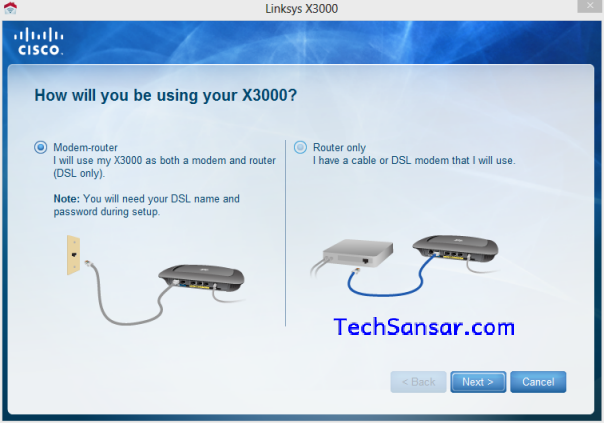
Cisco Linksys X3000 series ADSL Router Setup modes for NTC ADSL

Cisco Linksys X3000 series ADSL Router Setup modes for NTC ADSL

Last weekend some guys here at TechSansar.com were trying to fool Nepal Telecom’s ADSL Broadband Internet Services and we all are still surprised how easy it was to hack NTC’s ADSL. Though we are not going to teach you how to crack or hack or guesstimate ADSL username and password, we are surely going to tell you to strengthen your ADSL internet connection so that others would not be able to connect via your credentials.

Nepal Telecom has implemented a port or line binding feature so that the ADSL username is tied to the particular telephone number being subscribed to.

Hence, even if somebody knows your default username & password of ADSL (which is, again let us say, anybody could guess & call it ADSL hacking!) can not use in their own telephone number HOWEVER they can alter your details at ADSL customer self-care called UshaComm Web Services at https://192.168.117.7:8443/ISCare/NewAge/H_home.jsp

URGENT: Visit ADSL Self-care customer page to manage your security settings now, Understanding Nepal Telecom’s Self-care Customer Care Service Interface for ADSL & WiMAX Broadband Services

There are enough proofs for hacking NTC ADSL, not only we (guys at TechSansar.com) but also few technocrat and computer crack (as they liked to be called as) visitors have shared their views. So, it’s time to safeguard your ADSL connection. Don’t let you pay for your ADSL line while you can’t use it yourself. There might be so many blunders that you might be committing unknowingly.

The first time we experienced the ADSL connection from Nepal Telecom, they give the same username and password to all of their visitors. And changing the NTC ADSL password is not that easy stuff, one has to go thru a lot of steps in Telecom’s site. Create a new a/c into their online customer center (which rarely worked for us, the page was never opened in fact), fill up all requirements (most of which are so confusing ones) and others to complete the steps.

Related Post

Syuchatar in Regional Context: A Policy Commentary on Sovereign AI Compute

Nepal’s Sovereign AI Compute Center at Syuchatar: A Technical Explainer

Nepal Budget 2083/84: A Comprehensive Reference on the Tech, IT and Innovation Provisions

Nepal’s Department of IT Saved Rs 98 Crore with Centralized A2P Messaging: A GovTech Success Story

So, TechSansar Team suggest you to change your ADSL password as soon as you feel like you’re unsafe or just for a fun.

The other problem might be with the Router which connects the two networks ie the NTC’s server and Your home computer network. Ensure that you are safe with your Wi-Fi connectivity. Encrypt it or allow certain MAC addresses or devices which you want to. (More on this on later articles with video)

Is your Wi-Fi unsecured? The Homegroup or Workgroup in Windows can bring you a lot of jeopardy if your not password safe. Change or ensure them to be @#$%*.

Another one is with your landline or PSTN telephone number. Always register to NTC ADSL broadband internet service with the number that is least know to others, in case if you have more than one landline numbers. You’ll know that you’ll not repent on doing this later.

We have a lot of security related and ADSL optimization articles undergoing and already published. So, visit them to help yourself or write to us.

Thanks to Guest author and users for requesting this article on: How to secure NTC ADSL Broadband Internet?

Tags: ADSLInternetNTC
Share212Tweet133Send
Previous Post

How to create a free blog in Nepali?

Next Post

Why pay thousands of rupees when you get a premium antivirus solution for free?

Related Posts

Illustrating Sovereign AI Compute in Nepal Syuchatar with circuitary
Featured

Syuchatar in Regional Context: A Policy Commentary on Sovereign AI Compute

This article is Part 2B of a TechSansar series on the FY 2083/84 Nepalese federal budget. Part 2A set out...

by E Lamsal
May 31, 2026
Technical explainer on Nepal's announced Sovereign AI Compute Center at Syuchatar. What Budget 2083/84 specified, what it didn't, and the four design questions that decide its outcome.
Featured

Nepal’s Sovereign AI Compute Center at Syuchatar: A Technical Explainer

This article is Part 2A of a TechSansar series on the FY 2083/84 federal budget. Part 1 set out the...

by E Lamsal
May 30, 2026

Recent News

Illustrating Sovereign AI Compute in Nepal Syuchatar with circuitary

Syuchatar in Regional Context: A Policy Commentary on Sovereign AI Compute

May 31, 2026
Technical explainer on Nepal's announced Sovereign AI Compute Center at Syuchatar. What Budget 2083/84 specified, what it didn't, and the four design questions that decide its outcome.

Nepal’s Sovereign AI Compute Center at Syuchatar: A Technical Explainer

May 30, 2026
Nepal budget 2083-84 on IT

Nepal Budget 2083/84: A Comprehensive Reference on the Tech, IT and Innovation Provisions

May 30, 2026
Success Story of a GovTech

Nepal’s Department of IT Saved Rs 98 Crore with Centralized A2P Messaging: A GovTech Success Story

December 31, 2025
Hostinger
  • News
  • Tech
  • Event
Generate free QR Codes with QRSansar

TechSansar.com, ICT For Media Pvt Ltd, Regd #249079/077/078, VAT #609868175.
By continuing to use this site, you agree to our cookies and privacy policies.
Here is our Do Not Track (DNT) Guide. Hosted on a VPS and uses this free PDF tool. You can also subscribe to our newsletter.
Creating tech contents for the b̶o̶t̶s̶ humans since 2009 • Team TechSansar • ICT4M with ❤ from Nepal

Welcome Back!

Login to your account below

Forgotten Password? Sign Up

Create New Account!

Fill the forms below to register

All fields are required. Log In

Retrieve your password

Please enter your username or email address to reset your password.

Log In
No Result
View All Result
  • Home
  • Shop peripherals
  • Buy softwares
  • Top websites
  • Contact us

TechSansar.com, ICT For Media Pvt Ltd, Regd #249079/077/078, VAT #609868175.
By continuing to use this site, you agree to our cookies and privacy policies.
Here is our Do Not Track (DNT) Guide. Hosted on a VPS and uses this free PDF tool. You can also subscribe to our newsletter.
Creating tech contents for the b̶o̶t̶s̶ humans since 2009 • Team TechSansar • ICT4M with ❤ from Nepal




