

• Login
  • Register
Thursday, June 4, 2026
Generate QR Codes
Free PDF Tools
Free Web Audit 360
TechSansar.com
  • Services
  • Top Posts
  • Nepali IT
  • Startups
  • Tech News
  • Categories
    • News
      • Tech
No Result
View All Result
TechSansar.com
  • Services
  • Top Posts
  • Nepali IT
  • Startups
  • Tech News
  • Categories
    • News
      • Tech
No Result
View All Result
TechSansar.com

How to wirelessly project or cast Windows 10 computers to the Smart TVs

TechSansar Editor by TechSansar Editor
March 8, 2020
in Tutorials
A A
0
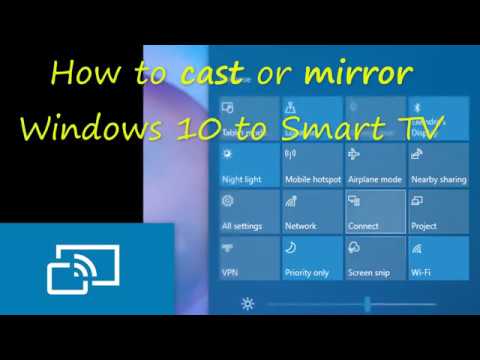
Wirelessly casting projecting Windows to Smart TV

Wirelessly casting projecting Windows to Smart TV

Related Post

How to reduce background noise during Microsoft Teams or Zoom meetings

Remove add-in services from Outlook, LeadBoxer as an example

Fix for “Sorry, another account from your organization is already signed in on this computer.”

Create Watermark of image using PHP

Got a Smart TV and want to wirelessly cast your screen or do a screen mirroring from the Windows 10 computer? You can easily do the wireless projection or casting of your Windows 10 computer to your Smart Television including major LGs, Samsung, TCL and other brand TVs. Wireless projection needs to be supported by your PC and have Miracast or other casting available at your TV end.
Here is how you can do wireless casting or screen mirroring depending upon your need. All you need is a Wireless Display (WiDi) supported computer and a Smart TV (with Miracast) natively inbuilt.


Tags: CastSmartTVWirelessWireless Display
Share213Tweet133Send
Previous Post

How to factory reset Google Nest Hub

Next Post

IDP launches Study Abroad app to connect students in Nepal with leading universities

Related Posts

Reduce background noise during Microsoft Teams or Zoom meetings
How To

How to reduce background noise during Microsoft Teams or Zoom meetings

In this tutorial, we present how to reduce external noise from your microphone during Microsoft Teams and Zoom sessions. We...

by TechSansar Editor
May 20, 2021
Permanently Remove LeadBoxer from Outlook
How To

Remove add-in services from Outlook, LeadBoxer as an example

If you use Outlook email as a part of Microsoft 365 services, you might have noticed that on your desktop...

by TechSansar Editor
January 29, 2021

Recent News

Illustrating Sovereign AI Compute in Nepal Syuchatar with circuitary

Syuchatar in Regional Context: A Policy Commentary on Sovereign AI Compute

May 31, 2026
Technical explainer on Nepal's announced Sovereign AI Compute Center at Syuchatar. What Budget 2083/84 specified, what it didn't, and the four design questions that decide its outcome.

Nepal’s Sovereign AI Compute Center at Syuchatar: A Technical Explainer

May 30, 2026
Nepal budget 2083-84 on IT

Nepal Budget 2083/84: A Comprehensive Reference on the Tech, IT and Innovation Provisions

May 30, 2026
Success Story of a GovTech

Nepal’s Department of IT Saved Rs 98 Crore with Centralized A2P Messaging: A GovTech Success Story

December 31, 2025
Hostinger
  • News
  • Tech
  • Event
Generate free QR Codes with QRSansar

TechSansar.com, ICT For Media Pvt Ltd, Regd #249079/077/078, VAT #609868175.
By continuing to use this site, you agree to our cookies and privacy policies.
Here is our Do Not Track (DNT) Guide. Hosted on a VPS and uses this free PDF tool. You can also subscribe to our newsletter.
Creating tech contents for the b̶o̶t̶s̶ humans since 2009 • Team TechSansar • ICT4M with ❤ from Nepal

Welcome Back!

Login to your account below

Forgotten Password? Sign Up

Create New Account!

Fill the forms below to register

All fields are required. Log In

Retrieve your password

Please enter your username or email address to reset your password.

Log In
No Result
View All Result
  • Home
  • Shop peripherals
  • Buy softwares
  • Top websites
  • Contact us

TechSansar.com, ICT For Media Pvt Ltd, Regd #249079/077/078, VAT #609868175.
By continuing to use this site, you agree to our cookies and privacy policies.
Here is our Do Not Track (DNT) Guide. Hosted on a VPS and uses this free PDF tool. You can also subscribe to our newsletter.
Creating tech contents for the b̶o̶t̶s̶ humans since 2009 • Team TechSansar • ICT4M with ❤ from Nepal




