

• Login
  • Register
Sunday, July 19, 2026
Generate QR Codes
Free PDF Tools
Free Web Audit 360
TechSansar.com
  • Services
  • Top Posts
  • Nepali IT
  • Startups
  • Tech News
  • Categories
    • News
      • Tech
No Result
View All Result
TechSansar.com
  • Services
  • Top Posts
  • Nepali IT
  • Startups
  • Tech News
  • Categories
    • News
      • Tech
No Result
View All Result
TechSansar.com

Instant Articles not working? Here is a fix for Caught Exception fatal error by Facebook Instant Articles.

TechSansar Editor by TechSansar Editor
November 7, 2016
in Tutorials
A A
0
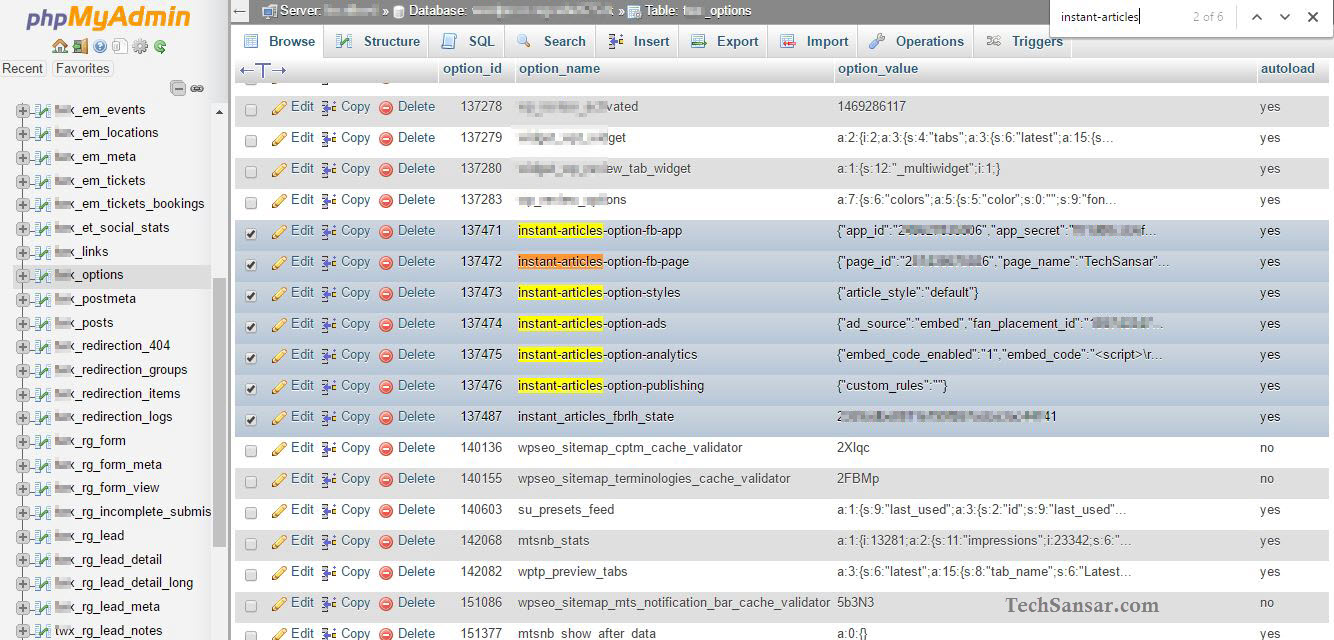
Searching WordPress Database for Instant Articles

Searching WordPress Database for Instant Articles

Related Post

How to reduce background noise during Microsoft Teams or Zoom meetings

Remove add-in services from Outlook, LeadBoxer as an example

Fix for “Sorry, another account from your organization is already signed in on this computer.”

Create Watermark of image using PHP

By now you should have probably enabled Facebook’s mobile publishing format Instant Articles for speedy and mobile friendly serving. If not click here to learn how to sign up for Instant Articles and start publishing along with making money from Facebook. In this article we are going to discuss about fatal errors caused by Facebook’s Instant Articles.
Ever seen an fatal error like this uncaught exception or anything related to error in validating Facebook tokens or sessions?

Facebook Instant Articles Fatal Error caused uncaught exception
Fatal error: Uncaught exception
'Facebook Exceptions FacebookAuthenticationException' with message "Error validating access token: The session has been invalidated because the user has changed the password. in /wordpress/../wp-content/plugins/fb-instant-articles/vendor/facebook/graph-sdk/src/Facebook/Exceptions/FacebookResponseException.php:89
Stack trace: #0 /wp-content/plugins/fb-instant-articles/vendor/facebook/graph-sdk/src/Facebook/FacebookResponse.php(210):
Facebook Exceptions FacebookResponseE
sdk/src/Facebook/FacebookResponse.php(82): Facebook FacebookResponse- decodeBody0 3 /srv/ in
/srv/content/plugins/fb-instant-articles/vendor/facebook/graph
sdk/src/Facebook/Exceptions/FacebookResponseException.php on line 89

Solving Instant Articles Fatal Errors 

First of all it’s most important to understanding what’s causing the fatal error exception caught. Facebook’s Instant Articles for WP plugin that powers WordPress based websites to publish the articles instantly is notoriously quite backward in sense of using server-side authentication flow. If you happen to be an admin of the Facebook page that has Instant Articles publishing enabled and you do one of the following with your Facebook account, then you might run into multiple issues of expired access tokens as mentioned in Facebook’s developer guidelines here.
4 different scenarios of handling expired access tokens

  1. The token expires after expires time (2 hours is the default).
  2. The user changes her password which invalidates the access token.
  3. The user de-authorizes your app.
  4. The user logs out of Facebook.

If Instant Articles for WP plugin is breaking your (admin or dashboard’s) plugin page, and you are receiving errors that doesn’t even perish after deleting the plugin files from the WordPress’s plugin directory at your host; then it’s time to go the database way.

Searching WordPress Database for Instant Articles
On your database – we are using PHPMyAdmin for MySQL in ServerPilot managed Digital Ocean VPS for TechSansar – search in tableprefix_options table for option_name Instant-Articles. You can directly find Instant-Articles values in WordPress database or can manually do SQL search as illustrated below.
Do not forget to take backup of your database or entire WordPress before committing changes in system files or database itself.
Searching and manually modifying table values in WordPress Database
You the have options to either directly change the Facebook App ID and Secret Key or delete all Instant Article values and reinstall the plugin again from the scratch.
You can also remove all transient options that may be associated with Instant Article plugin, you can recognize them in one of these formats
_transient_instantarticles_content_36370
_transient_timeout_instantarticles_mod_36373
However, these transient values may content meta or information regarding already created instant article from the published blog posts. But deleting these transient values in WordPress’s database should make the sky fall for you.
This method of changing plugin meta and values in WordPress database should work for all other plugins that cause such errors. Hope this solves your issues too.

Tags: FacebookTips & TricksWebsiteswordpress
Share212Tweet133Send
Previous Post

Configuring TOTO Link Wireless Routers for ADSL, FTTH and Wireless

Next Post

Smart Telecom, next operator looking for 4G in Nepal

Related Posts

Reduce background noise during Microsoft Teams or Zoom meetings
How To

How to reduce background noise during Microsoft Teams or Zoom meetings

In this tutorial, we present how to reduce external noise from your microphone during Microsoft Teams and Zoom sessions. We...

by TechSansar Editor
May 20, 2021
Permanently Remove LeadBoxer from Outlook
How To

Remove add-in services from Outlook, LeadBoxer as an example

If you use Outlook email as a part of Microsoft 365 services, you might have noticed that on your desktop...

by TechSansar Editor
January 29, 2021

Recent News

Gen Z Protest Kathmandu 2025

July 4, 2026
The Launch That Moved Syuchatar: YetiCloud.AI and the Night Nepal’s Compute Policy Went Public

The Launch That Moved Syuchatar: YetiCloud.AI and the Night Nepal’s Compute Policy Went Public

July 4, 2026
Illustrating Sovereign AI Compute in Nepal Syuchatar with circuitary

Syuchatar in Regional Context: A Policy Commentary on Sovereign AI Compute

May 31, 2026
Technical explainer on Nepal's announced Sovereign AI Compute Center at Syuchatar. What Budget 2083/84 specified, what it didn't, and the four design questions that decide its outcome.

Nepal’s Sovereign AI Compute Center at Syuchatar: A Technical Explainer

May 30, 2026
Hostinger
  • News
  • Tech
  • Event
Generate free QR Codes with QRSansar

TechSansar.com, ICT For Media Pvt Ltd, Regd #249079/077/078, VAT #609868175.
By continuing to use this site, you agree to our cookies and privacy policies.
Here is our Do Not Track (DNT) Guide. Hosted on a VPS and uses this free PDF tool. You can also subscribe to our newsletter.
Creating tech contents for the b̶o̶t̶s̶ humans since 2009 • Team TechSansar • ICT4M with ❤ from Nepal

Welcome Back!

Login to your account below

Forgotten Password? Sign Up

Create New Account!

Fill the forms below to register

All fields are required. Log In

Retrieve your password

Please enter your username or email address to reset your password.

Log In
No Result
View All Result
  • Home page
  • Shop peripherals
  • Buy software
  • Featured articles
  • My account

TechSansar.com, ICT For Media Pvt Ltd, Regd #249079/077/078, VAT #609868175.
By continuing to use this site, you agree to our cookies and privacy policies.
Here is our Do Not Track (DNT) Guide. Hosted on a VPS and uses this free PDF tool. You can also subscribe to our newsletter.
Creating tech contents for the b̶o̶t̶s̶ humans since 2009 • Team TechSansar • ICT4M with ❤ from Nepal



