

• Login
  • Register
Saturday, July 18, 2026
Generate QR Codes
Free PDF Tools
Free Web Audit 360
TechSansar.com
  • Services
  • Top Posts
  • Nepali IT
  • Startups
  • Tech News
  • Categories
    • News
      • Tech
No Result
View All Result
TechSansar.com
  • Services
  • Top Posts
  • Nepali IT
  • Startups
  • Tech News
  • Categories
    • News
      • Tech
No Result
View All Result
TechSansar.com

[How to] Ncell 3G: Activate, subscribe & purchase Internet data package: Guided tutorial

ts by ts
June 8, 2014
in Telecom
A A
0
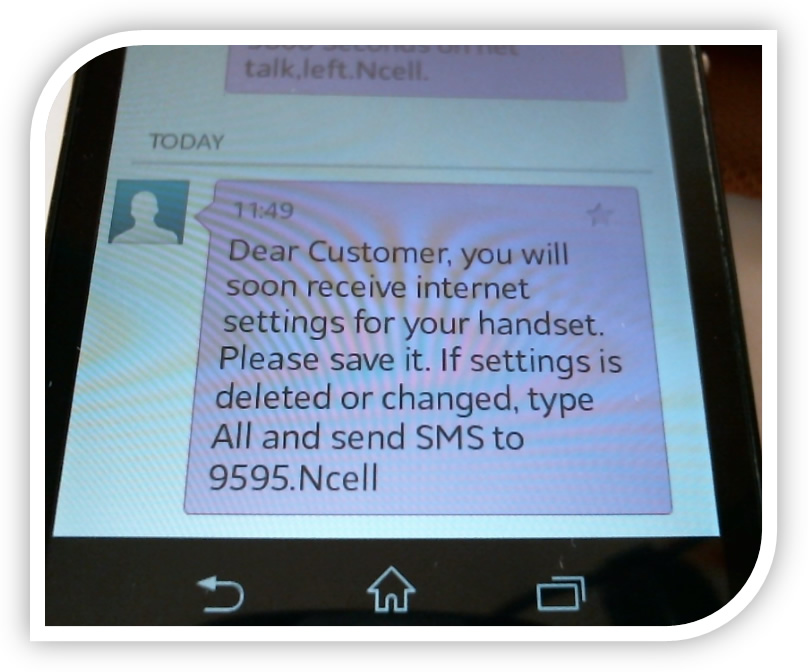
SMS to notify Ncell customer will soon receive internet settings for their handset

SMS to notify Ncell customer will soon receive internet settings for their handset

Related Post

What is VoLTE & how to activate VoLTE for Nepal Telecom mobile SIM

Why You Shouldn’t Abandon Your Business Number

Nepal Telecom launches 4.5G VoLTE in 32 more cities

4G LTE in Nepal: Everything you need to know about NTC and Ncell 4G.

As the name suggests, 3G is the 3rd generation of cellular mobile telecommunications technology – which delivers the shortcomings of 2G cellular with comparatively faster internet speed (384Kbps moving to 2Mbps stationary) and more services on the cellular aspects besides voice call. By popular demand, we have re-written a completely revamped guided tutorial on Ncell 3G activation, subscription and purchasing proper Internet data packages.

3G or mobile’s cellular data can be used to connect your mobile phone to the internet and do the email, apps and browsing things. Plus, with hotspot enabled in your device, other devices can use your mobile’s cellular data for using Internet (which is obviously costly.)

Ncell 3G Internet Service *100# USSD Query String

How to activate Ncell 3G or mobile Internet?

Every SIM card Ncell provides is already 3G activated, in fact mobile Internet activated – meaning ALL NCELL SIM CARDS ARE PRE-ACTIVATED FOR INTERNET – GPRS / EDGE / 3G. Hence, there is no need to work out to activate your Ncell SIM for 3G services. Just ensure you are in Ncell’s 3G network coverage and your mobile or smartphone handset supports 3G.

In case, you need to activate Ncell SIM card for mobile Internet for some reason, the procedure is fairly simple.

Type A and send SMS to 900224

OR

Dial 900 and follow the IVR instructions.

OR

Dial *100# and follow the on-screen instructions to activate Ncell Internet.

How to get Ncell 3G Internet settings on your mobile phone?

SMS String 9595 to receive Ncell Internet setting

Even though all Ncell’s SIM cards are pre-activated for using Internet including 3G, some mobile handsets and smartphones require to have  proper settings to connect to the Internetwork.

Type ALL and SMS to 9595.

This instruction will send you automatic settings for your mobile phone. Save this settings and you are ready with Internet on your mobile phone. Or for better functioning you might need to restart your mobile phone. The magic is in most of the cases, Ncell system determines your mobile phone’s make and model, and hence send the proper device specific settings.

SMS to notify Ncell customer will soon receive internet settings for their handset
Ncell settings for Internet and MMS ready to install

In some cases, your smartphone won’t receive any 3G or Internet settings from Ncell, wherein your device is either already able to connect to Ncell cellular data network like in iPhone or you might need to proceed to settings like in many low-end Android and Chinese local brand mobile phones.

APN web
IP Address / Proxy IP 10.68.1.149
Port 9201 (For WAP1 – for Chinese local brands) 8080 (For HTTP or WAP2 – for smartphones)
Home page http://techsansar.com or any website
(not always mandatory)

Do not forget to restart your mobile handset after settings are placed in to ensure effective saving and functioning of the Internet connectivity.

How to subscribe Ncell 3G Internet package?

The bigger the package, the cheaper is the price. Hence, larger volumes of data will cost far less than the lesser one. For example, if you buy 10 GB package the per MB price rate in this package is relatively cheaper than the 5 GB package.

The table below gives the glimpse of how Ncell’s latest (June 2014) 3G Internet data packages cost:

3G Internet Packages in Ncell

Please, check Ncell’s official webpage here for the latest mobile Internet packages and prices.

How to deactivate Ncell 3G or mobile Internet?

Unless you are worried of automatic data charging which can be controlled in almost all handsets with little trick as mentioned here or subscribed to recurring data package in mistake (which can be cancelled by calling to Ncell or procedure as mentioned below), you might not face a condition to deactivate Ncell 3G or mobile Internet. However, in many scenarios users might want to deactivate Ncell 3G mobile Internet from the mobile phone or portable Mi-Fi devices. Simply do one of the following to deactive your Ncell 3G subscription

Type R and send SMS to 900224

OR

Dial 900 and follow the IVR instructions.

OR

Dial *100# and follow the on-screen instructions to deactivate Ncell Internet.

You can use Ncell Internet in various forms & devices also. Share us your experience of 3G Internet in Ncell’s cellular network or any issues while using on the comment form below.
3G articles in TechSansar.com
  • Hack Ncell 3G or hack NTC, why do they even exist? 
  • LTE or WiMAX : What should Nepal go for? 
  • IP CDMA in Nepal: Frequently asked questions (FAQs)
  • NTC 3G/GPRS Configuration for Smart Phones including iPhone
  • NTC user? Here is [How to] NTC 3G: Activate, subscribe & purchase Internet data package: Guided tutorial
Tags: 3GInternetNcellTutorials
Share212Tweet133Send
Previous Post

How to change Country/Region and Regional Format on Windows Phone 8.1?

Next Post

[How to] NTC 3G: Activate, subscribe & purchase Internet data package: Guided tutorial

Related Posts

How to activate NT 4G VoLTE Service in Nepal
Telecom

What is VoLTE & how to activate VoLTE for Nepal Telecom mobile SIM

VoLTE, in simple terms, refers to Voice over LTE aka 4G cellular network - meaning voice calls are served over...

by TechSansar Editor
May 17, 2021
Business telephony
Telecom

Why You Shouldn’t Abandon Your Business Number

If you are a business owner, then you already know that  business is all about delivering what your customers want....

by tsGeek
July 24, 2024

Recent News

Gen Z Protest Kathmandu 2025

July 4, 2026
The Launch That Moved Syuchatar: YetiCloud.AI and the Night Nepal’s Compute Policy Went Public

The Launch That Moved Syuchatar: YetiCloud.AI and the Night Nepal’s Compute Policy Went Public

July 4, 2026
Illustrating Sovereign AI Compute in Nepal Syuchatar with circuitary

Syuchatar in Regional Context: A Policy Commentary on Sovereign AI Compute

May 31, 2026
Technical explainer on Nepal's announced Sovereign AI Compute Center at Syuchatar. What Budget 2083/84 specified, what it didn't, and the four design questions that decide its outcome.

Nepal’s Sovereign AI Compute Center at Syuchatar: A Technical Explainer

May 30, 2026
Hostinger
  • News
  • Tech
  • Event
Generate free QR Codes with QRSansar

TechSansar.com, ICT For Media Pvt Ltd, Regd #249079/077/078, VAT #609868175.
By continuing to use this site, you agree to our cookies and privacy policies.
Here is our Do Not Track (DNT) Guide. Hosted on a VPS and uses this free PDF tool. You can also subscribe to our newsletter.
Creating tech contents for the b̶o̶t̶s̶ humans since 2009 • Team TechSansar • ICT4M with ❤ from Nepal

Welcome Back!

Login to your account below

Forgotten Password? Sign Up

Create New Account!

Fill the forms below to register

All fields are required. Log In

Retrieve your password

Please enter your username or email address to reset your password.

Log In
No Result
View All Result
  • Home page
  • Shop peripherals
  • Buy software
  • Featured articles
  • My account

TechSansar.com, ICT For Media Pvt Ltd, Regd #249079/077/078, VAT #609868175.
By continuing to use this site, you agree to our cookies and privacy policies.
Here is our Do Not Track (DNT) Guide. Hosted on a VPS and uses this free PDF tool. You can also subscribe to our newsletter.
Creating tech contents for the b̶o̶t̶s̶ humans since 2009 • Team TechSansar • ICT4M with ❤ from Nepal



