• Login
  • Register
Sunday, July 19, 2026
Generate QR Codes
Free PDF Tools
Free Web Audit 360
TechSansar.com
  • Services
  • Top Posts
  • Nepali IT
  • Startups
  • Tech News
  • Categories
    • News
      • Tech
No Result
View All Result
TechSansar.com
  • Services
  • Top Posts
  • Nepali IT
  • Startups
  • Tech News
  • Categories
    • News
      • Tech
No Result
View All Result
TechSansar.com

How to get NT WiFi password & use HotSpot

ts by ts
April 24, 2015
in Internetworking
A A
0
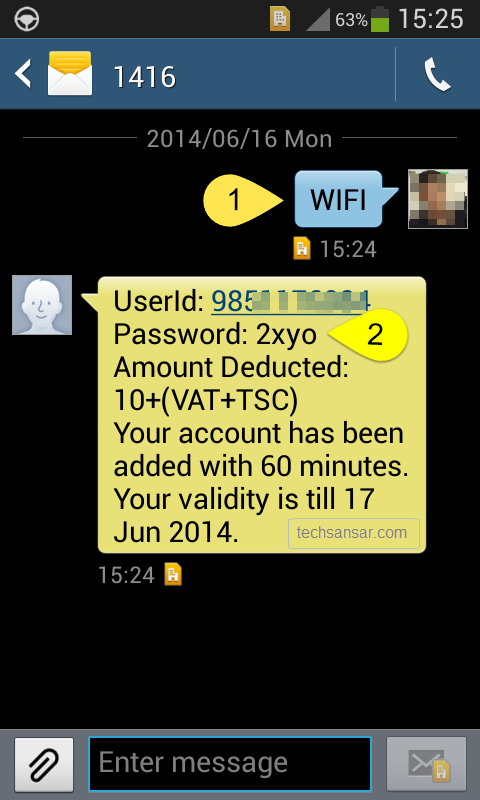
Sending SMS to get NT WiFi hotspot password

Sending SMS to get NT WiFi hotspot password

Related Post

What is band steering and why you should use it #WiFi #Networking

7 Easy Fixes for Slow Wi-Fi, how to improve Wi-Fi signal coverage!

Setup Internet Access in MikroTik RouterBoard in 2 minutes (static IP)

IPv6 Scenario in Nepal with IPv6 deployment statistics

How to hack NTC data! This is one of the most asked questions in our Ask page. Forget the twisted way, we can use cheaper wireless Internet from Nepal Telecom. For 10 rupees per hour, we can use NT WiFi hotspot in a connecting device either a smartphone or a tablet or a laptop computer. In this article, we share how to use Nepal Telecom’s Wimax based NT WiFi hotspot.

However, download speed or bandwidth of such NT WiFi vary according to user base ie number of users using or sharing the same hotspot with you; and the location of NT WiFi hotspot location or BTS.

Using NT WiFi Hotspot is very easy – all you need is to

  1. be in the location where NT WiFi hotspot is available and
  2. a NT mobile phone number (in Namaste prepaid you need at least 13 rupees.)

How to connect NT WiFi

Provided you have both above points valid, follow the following steps to connect to NT WiFi on your mobile phone or tablet or laptop or even wireless card-enabled computer machine.

  1. Search for WiFi hotspot name (also called AP or SSID), if you see NT WiFi connect to it.
  2. After sometime (on the background you will be assigned a local IP address to identify your device) you will be automatically redirected to the default web browser if not you should open your web browser say Google Chrome in Android, Internet Explorer in Windows 8.x and Safari in iOS devices.
  3. You are asked to enter username and password to login to the web portal just opened in your default web browser.
  4. NT WiFi Password: Send a blank text message or SMS to 1416. After sometimes you’ll get an SMS back from NTC that has NT WiFi hotspot password. Only NT GSM Prepaid and Postpaid users can request the password via texting 1416 number. Not necessarily you need to have your own NTC phone with you as you can request password via your friend or family’s NT mobile phone.
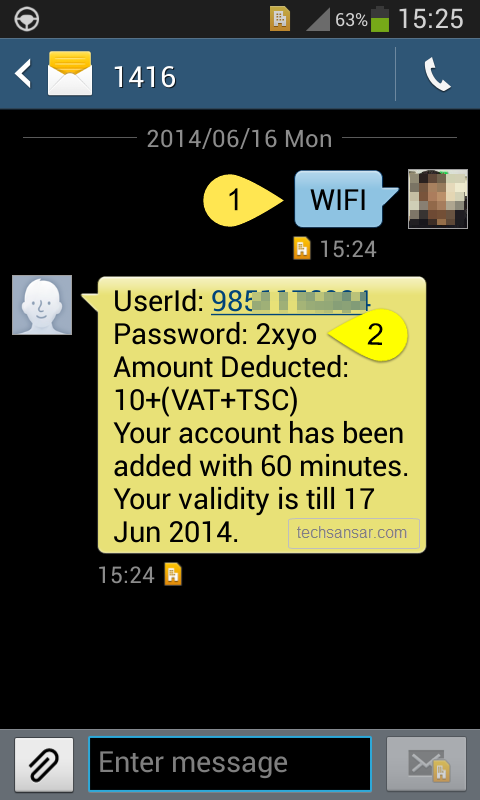
    Sending SMS to get NT WiFi hotspot password
    Sending SMS to get NT WiFi hotspot password
  5. Now use your mobile phone number and the password to login to the NT WiFi hotspot system. After successful login, 60 minutes meter starts rolling – go ahead open your favorite app or website to use the Internet.
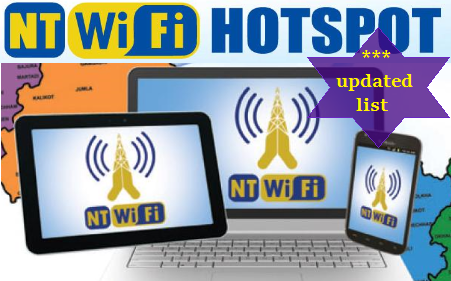
List of NT WiFi Hotspot in Nepal
 
If you want to know locations where NT WiFi Hotspots are available, check our updated list here.
 
Do note: NT WiFi has access to torrents, NTC’s CDN including YouTube caching, NTC’s own intranet facilities including services to manage ADSL WiMAX customer self-care center.
 

Tags: HotspotInternetNTCWi-FiWiMAX
Share213Tweet133Send
Previous Post

How to re-enable Snipping Tool in Windows Vista, 7, 8, 8.1 & Windows 10

Next Post

#NepalEarthquake – how to rescue, volunteer, donate & support

Related Posts

Band steering operation
Internetworking

What is band steering and why you should use it #WiFi #Networking

With an ever-increasing number of Internet-connected devices, it is ideal to have a seamless Wireless network where clients are on...

by TechSansar Editor
July 26, 2024
Improve wifi signal coverage
Internetworking

7 Easy Fixes for Slow Wi-Fi, how to improve Wi-Fi signal coverage!

Often time we come across situations where we struggle to either maintain that only one bar of the WiFi signal...

by TechSansar Editor
July 22, 2019

Recent News

Gen Z Protest Kathmandu 2025

July 4, 2026
The Launch That Moved Syuchatar: YetiCloud.AI and the Night Nepal’s Compute Policy Went Public

The Launch That Moved Syuchatar: YetiCloud.AI and the Night Nepal’s Compute Policy Went Public

July 4, 2026
Illustrating Sovereign AI Compute in Nepal Syuchatar with circuitary

Syuchatar in Regional Context: A Policy Commentary on Sovereign AI Compute

May 31, 2026
Technical explainer on Nepal's announced Sovereign AI Compute Center at Syuchatar. What Budget 2083/84 specified, what it didn't, and the four design questions that decide its outcome.

Nepal’s Sovereign AI Compute Center at Syuchatar: A Technical Explainer

May 30, 2026
Hostinger
  • News
  • Tech
  • Event
Generate free QR Codes with QRSansar

TechSansar.com, ICT For Media Pvt Ltd, Regd #249079/077/078, VAT #609868175.
By continuing to use this site, you agree to our cookies and privacy policies.
Here is our Do Not Track (DNT) Guide. Hosted on a VPS and uses this free PDF tool. You can also subscribe to our newsletter.
Creating tech contents for the b̶o̶t̶s̶ humans since 2009 • Team TechSansar • ICT4M with ❤ from Nepal

Welcome Back!

Login to your account below

Forgotten Password? Sign Up

Create New Account!

Fill the forms below to register

All fields are required. Log In

Retrieve your password

Please enter your username or email address to reset your password.

Log In
No Result
View All Result
  • Home page
  • Shop peripherals
  • Buy software
  • Featured articles
  • My account

TechSansar.com, ICT For Media Pvt Ltd, Regd #249079/077/078, VAT #609868175.
By continuing to use this site, you agree to our cookies and privacy policies.
Here is our Do Not Track (DNT) Guide. Hosted on a VPS and uses this free PDF tool. You can also subscribe to our newsletter.
Creating tech contents for the b̶o̶t̶s̶ humans since 2009 • Team TechSansar • ICT4M with ❤ from Nepal