• Login
  • Register
Wednesday, July 8, 2026
Generate QR Codes
Free PDF Tools
Free Web Audit 360
TechSansar.com
  • Services
  • Top Posts
  • Nepali IT
  • Startups
  • Tech News
  • Categories
    • News
      • Tech
No Result
View All Result
TechSansar.com
  • Services
  • Top Posts
  • Nepali IT
  • Startups
  • Tech News
  • Categories
    • News
      • Tech
No Result
View All Result
TechSansar.com

Know more about Ncell's Wi-Fi Router – FAQs

ts by ts
November 29, 2011
in Telecom, Tutorials
A A
0
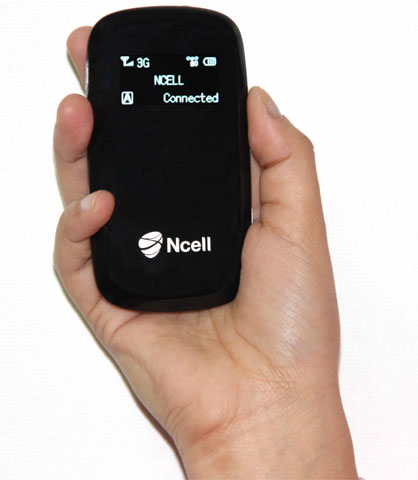
Ncell Connect Wi-Fi Router

Ncell Connect Wi-Fi Router

Related Post

How to reduce background noise during Microsoft Teams or Zoom meetings

What is VoLTE & how to activate VoLTE for Nepal Telecom mobile SIM

Remove add-in services from Outlook, LeadBoxer as an example

Fix for “Sorry, another account from your organization is already signed in on this computer.”

Ncell, the first private mobile operator and currently the largest ISP of Nepal, has recently launched its branded Wi-Fi router which allows upto eight users to access its 3G Internet connectivity. Ncell has again become successful in introducing a new technology in the Nepalese market, previously they had launched their own push and plug (USB) internet data cards named Ncell connect – similar to the one sold/used by UTL.

Ncell Connect Wi-Fi Router
All Ncell’s devices (this Wi-Fi router and data cards) are branded and locked to their network. This means you can’t use Ncell’s data card with other network’s SIM/UIM cards. Ncell is a step a head in this front as well, and has become successful to penetrate the market inspite of its expensive data rate. Ncell offers Internet speed at up to 3.6 Mbps (download) via Ncell connect.
Ncell’s Wi-Fi router is priced high at NRs 6,999 plus taxes and can be purchased at Ncell centers in Kathmandu and Pokhara. Does this mean this service is limited to these two cities only? The device works with any Connect SIM with existing tarrif plan.
So, what is the Wi-Fi Router?
Wi-Fi router is a small, pocket-size portable hardware device, similar to an ADSL (modem) router through which one can access internet – here 3G internet of Ncell. (Read article: time for pocket router)
What is the price and range of Ncell Wi-Fi Router?
The price is NRs 6,999+ taxes and the claimed range is 30 meters which is enough to be used indoors but less than one provided by today’s IEEE 8022.11 N technology-based routers/modems.
What is the backup time of Ncell Wi-Fi Router?
The company claims Ncell Wi-Fi router comes with 4 hours of battery life enabling subscribe to use internet during loadshedding. One need to recharge the Wi-Fi router’s battery after the backup time has finished.
What is the difference between hardware Wi-Fi router and software Wi-Fi router?
This is a good question for all tech enthusiasts. Ncell’s Wi-Fi router is obviously a hardware one. But today there are many software based Wi-Fi routers, commonly known as virtual routers, which can be used to create wireless home networking (read our article about this). Connectify and Microsoft Virtual Router are two most frequently used virtual Wi-Fi creating software applications. Using both Ncell’s Wi-Fi router and these software based virtual routers, one can connect to many (for Ncell limited to 8 ) users simultaneously formaing a wireless home networks (would be costly for Ncell’s network). The price of software- based virtual Wi-Fi router is NULL, unless you buy Connectify Pro.
I already have Ncell Connect data card and want to connect internet to my iPhone (smart phones having Wi-Fi). Do I need to purchase Ncell Wi-Fi router for this?
Obviously, NOT. You can use existing Ncell connect to surf internet in your computer (laptop) and use virtual routers (as answered in the previous question) to link the internet to you Wi-Fi enabled smart phone. (Read: how to create your own hotspot for free)
We welcome more queries. Happy surfing. (Ncell WiFi Router image taken from Ncell page)
Tags: 3GBroadbandMobilesNcellNepali TechTelecomTips & TricksWi-Fi
Share213Tweet133Send
Previous Post

CAN Infotech 2068 to be held in Magh 12-17th

Next Post

Nepali eBooks – Nepali literature goes Mobile

Related Posts

Reduce background noise during Microsoft Teams or Zoom meetings
How To

How to reduce background noise during Microsoft Teams or Zoom meetings

In this tutorial, we present how to reduce external noise from your microphone during Microsoft Teams and Zoom sessions. We...

by TechSansar Editor
May 20, 2021
How to activate NT 4G VoLTE Service in Nepal
Telecom

What is VoLTE & how to activate VoLTE for Nepal Telecom mobile SIM

VoLTE, in simple terms, refers to Voice over LTE aka 4G cellular network - meaning voice calls are served over...

by TechSansar Editor
May 17, 2021

Recent News

Illustrating Sovereign AI Compute in Nepal Syuchatar with circuitary

Syuchatar in Regional Context: A Policy Commentary on Sovereign AI Compute

May 31, 2026
Technical explainer on Nepal's announced Sovereign AI Compute Center at Syuchatar. What Budget 2083/84 specified, what it didn't, and the four design questions that decide its outcome.

Nepal’s Sovereign AI Compute Center at Syuchatar: A Technical Explainer

May 30, 2026
Nepal budget 2083-84 on IT

Nepal Budget 2083/84: A Comprehensive Reference on the Tech, IT and Innovation Provisions

May 30, 2026
Success Story of a GovTech

Nepal’s Department of IT Saved Rs 98 Crore with Centralized A2P Messaging: A GovTech Success Story

December 31, 2025
Hostinger
  • News
  • Tech
  • Event
Generate free QR Codes with QRSansar

TechSansar.com, ICT For Media Pvt Ltd, Regd #249079/077/078, VAT #609868175.
By continuing to use this site, you agree to our cookies and privacy policies.
Here is our Do Not Track (DNT) Guide. Hosted on a VPS and uses this free PDF tool. You can also subscribe to our newsletter.
Creating tech contents for the b̶o̶t̶s̶ humans since 2009 • Team TechSansar • ICT4M with ❤ from Nepal

Welcome Back!

Login to your account below

Forgotten Password? Sign Up

Create New Account!

Fill the forms below to register

All fields are required. Log In

Retrieve your password

Please enter your username or email address to reset your password.

Log In
No Result
View All Result
  • Home page
  • Shop peripherals
  • Buy software
  • Featured articles
  • My account

TechSansar.com, ICT For Media Pvt Ltd, Regd #249079/077/078, VAT #609868175.
By continuing to use this site, you agree to our cookies and privacy policies.
Here is our Do Not Track (DNT) Guide. Hosted on a VPS and uses this free PDF tool. You can also subscribe to our newsletter.
Creating tech contents for the b̶o̶t̶s̶ humans since 2009 • Team TechSansar • ICT4M with ❤ from Nepal