• Login
  • Register
Tuesday, July 7, 2026
Generate QR Codes
Free PDF Tools
Free Web Audit 360
TechSansar.com
  • Services
  • Top Posts
  • Nepali IT
  • Startups
  • Tech News
  • Categories
    • News
      • Tech
No Result
View All Result
TechSansar.com
  • Services
  • Top Posts
  • Nepali IT
  • Startups
  • Tech News
  • Categories
    • News
      • Tech
No Result
View All Result
TechSansar.com

Understanding Nepal Telecom's Self-care Customer Care Service Interface for ADSL & WiMAX Broadband Services

ts by ts
December 22, 2013
in Telecom, Tutorials
A A
0
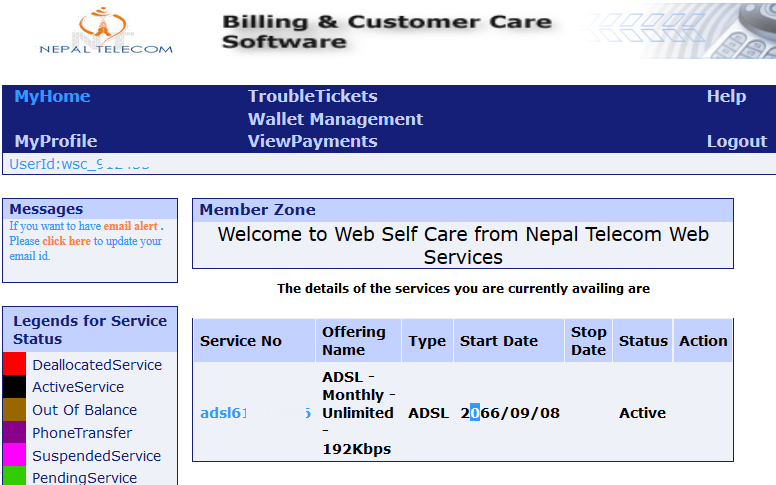
Nepal Telecom's Billing & Customer Care Software for ADSL & WiMAX Services

Nepal Telecom's Billing & Customer Care Software for ADSL & WiMAX Services

Related Post

How to reduce background noise during Microsoft Teams or Zoom meetings

What is VoLTE & how to activate VoLTE for Nepal Telecom mobile SIM

Remove add-in services from Outlook, LeadBoxer as an example

Fix for “Sorry, another account from your organization is already signed in on this computer.”

It’s no wonder that Nepal Telcom has poor customer care services in all or most of their telco services. With ever increasing Internet population in the country, Nepal telecom has also been expanding their broadband Internet services.

However, managing a large number of customers is a deal. We are not going to point the good and the bad of Nepal Telecom’s customer care services which might be an another discussion topic, but exploring the potential of self-care customer care interface that Nepal Telecom has launched for ADSL and WiMAX services (and WiFi services in near future.)

What can be done via Self-Care Customer Care Interface?

Nepal Telecom's Billing & Customer Care Software for ADSL & WiMAX Services

One can log on to Nepal Telecom’s ADSL & WiMAX Billing and Customer Care by visiting their local network https://192.168.117.7:8443/ISCare/NewAge/H_home.jsp?null which obviously works when a user is using NTC’s Internet (This link pseudo secured on SSL.)
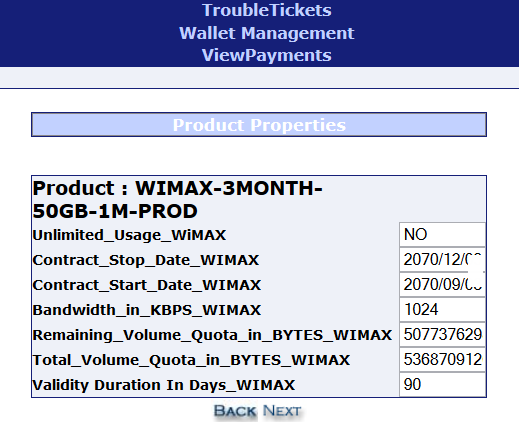
Nepal Telecom's WiMAX Product Properties showing details of the package includes broadband bandwidth & quota volume details

There are not much features that a customer can explore in UshaComm based Web Services for ADSL & WiMAX customers in Web self-care. However, common features shared by both ADSL and WiMAX services include the following:

  • Internet Services detail – package name, Internet connection type, dates and the status of the service
  • Change your NTC ADSL or WiMAX connection service password  and customer care password itself (which by default is same as your username)
  • Browse details broadband service properties including maximum possible bandwidth, balance validity, network path (Internetwork path of NTC), DSLAM Location
  • Remaining payment balance for ADSL or WiMAX, or when to renew the service (which NTC calls Wallet Management)
  • Detail product properties associated with ADSL or WiMAX, specifically contract dates, bandwidth, information on port binding
  • Product properties for WiMAX includes bandwidth in KBPS, remaining Volume quota vs total volume quota subscribed for WiMAX
  • All historical payment details since the start of your internet service along with receipt number
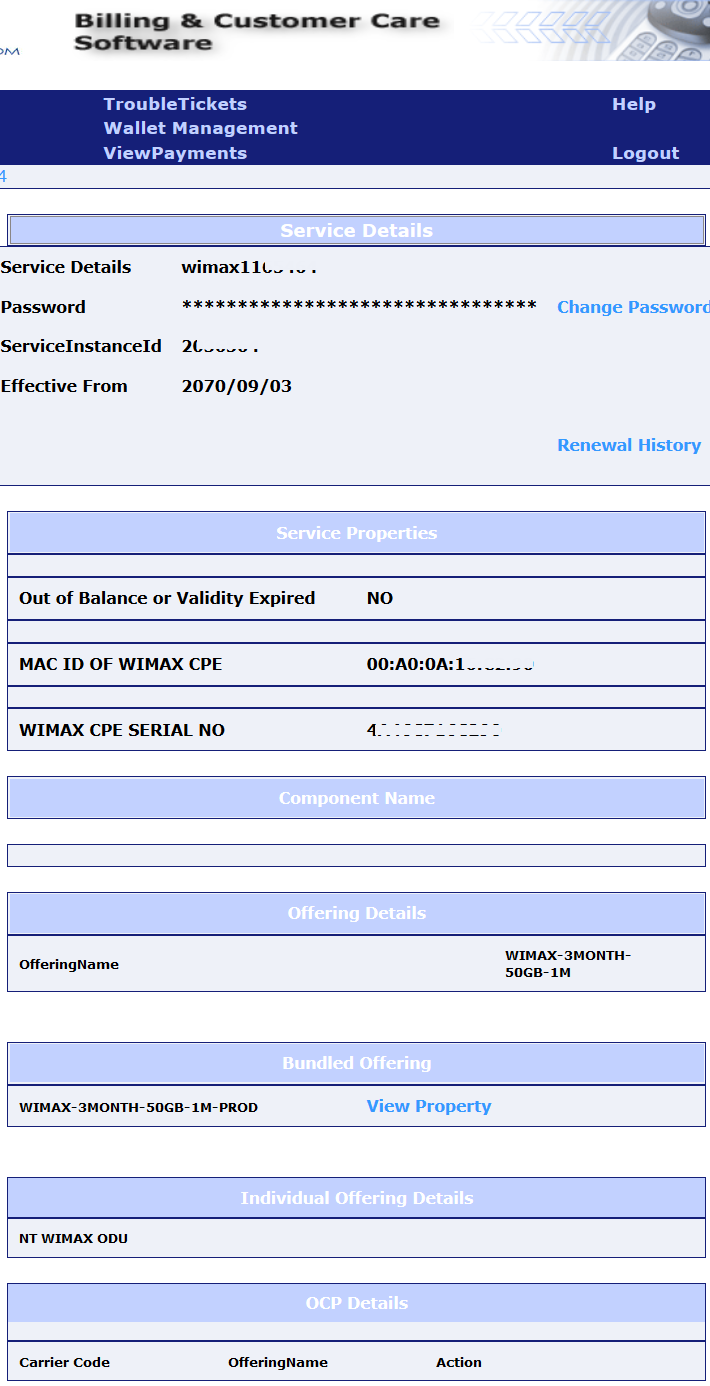
Service Details of NTC WiMAX Service as shown in Billing and Customer Care Software

How to lodge complaint about NT ADSL & WiMAX?

Customers can file complaints about their ADSL and WiMAX Internet subscription via their self-care service. Just visit ToubleTickets section in the Billing & Customer Care Software interface. Choose the option to log a complaint. Our experience – we never received a call back call to fix ADSL problems nor an email reply from the Telecom.
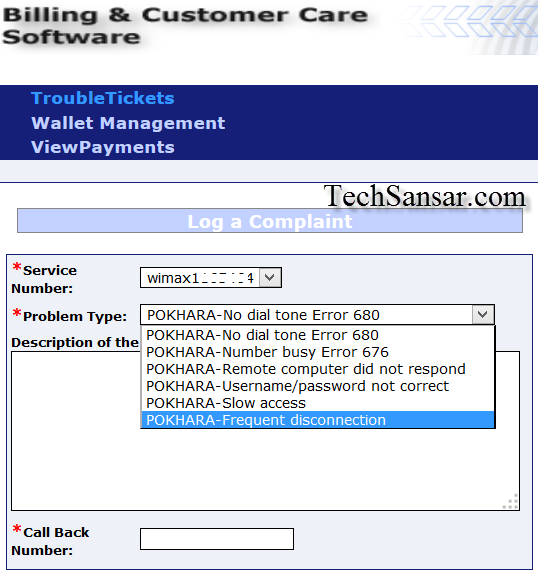
Nepal Telecom TroubleTickets. How to file a complaint regarding ADSL & WiMAX Service from Self-Care Customer Care Service

Since the self-care customer service is available in English only, most of the users probably could not make it thru. Besides this, the interface is cluttered and customers will have to work little bit more to find what they are looking for. Plus, among other limitations, the periodic bandwidth usage reports are also lacking.

WiMAX
  • Nepal Telecom WiMAX Broadband Wireless Service – Frequently Asked Questions (FAQs)
  • WiMAX in Nepal finally a reality – Nepal Telecom launches WiMAX
  • LTE or WiMax : what should Nepal go for?
  • Overview of Wireless Internet Service (WiFi) Providers in Nepal
  • 4G – are you all set for the fourth generation of mobile telephony?

This article included some tips on using NTC’s self-care customer care system and how to get into detail of your ADSL & WiMAX accounts including to change your Nepal Telecom’s ADSL and WiMAX passwords. Share your say.
Tags: ADSLBandwidthNepalNTCWiMAX
Share213Tweet133Send
Previous Post

How to turn Linux machine into a wifi Access Point

Next Post

Between the lines: Subisu CAN Info-tech 2014 ICT Services & Products Exhibition & Conference Detail

Related Posts

Reduce background noise during Microsoft Teams or Zoom meetings
How To

How to reduce background noise during Microsoft Teams or Zoom meetings

In this tutorial, we present how to reduce external noise from your microphone during Microsoft Teams and Zoom sessions. We...

by TechSansar Editor
May 20, 2021
How to activate NT 4G VoLTE Service in Nepal
Telecom

What is VoLTE & how to activate VoLTE for Nepal Telecom mobile SIM

VoLTE, in simple terms, refers to Voice over LTE aka 4G cellular network - meaning voice calls are served over...

by TechSansar Editor
May 17, 2021

Recent News

Illustrating Sovereign AI Compute in Nepal Syuchatar with circuitary

Syuchatar in Regional Context: A Policy Commentary on Sovereign AI Compute

May 31, 2026
Technical explainer on Nepal's announced Sovereign AI Compute Center at Syuchatar. What Budget 2083/84 specified, what it didn't, and the four design questions that decide its outcome.

Nepal’s Sovereign AI Compute Center at Syuchatar: A Technical Explainer

May 30, 2026
Nepal budget 2083-84 on IT

Nepal Budget 2083/84: A Comprehensive Reference on the Tech, IT and Innovation Provisions

May 30, 2026
Success Story of a GovTech

Nepal’s Department of IT Saved Rs 98 Crore with Centralized A2P Messaging: A GovTech Success Story

December 31, 2025
Hostinger
  • News
  • Tech
  • Event
Generate free QR Codes with QRSansar

TechSansar.com, ICT For Media Pvt Ltd, Regd #249079/077/078, VAT #609868175.
By continuing to use this site, you agree to our cookies and privacy policies.
Here is our Do Not Track (DNT) Guide. Hosted on a VPS and uses this free PDF tool. You can also subscribe to our newsletter.
Creating tech contents for the b̶o̶t̶s̶ humans since 2009 • Team TechSansar • ICT4M with ❤ from Nepal

Welcome Back!

Login to your account below

Forgotten Password? Sign Up

Create New Account!

Fill the forms below to register

All fields are required. Log In

Retrieve your password

Please enter your username or email address to reset your password.

Log In
No Result
View All Result
  • Home page
  • Shop peripherals
  • Buy software
  • Featured articles
  • My account

TechSansar.com, ICT For Media Pvt Ltd, Regd #249079/077/078, VAT #609868175.
By continuing to use this site, you agree to our cookies and privacy policies.
Here is our Do Not Track (DNT) Guide. Hosted on a VPS and uses this free PDF tool. You can also subscribe to our newsletter.
Creating tech contents for the b̶o̶t̶s̶ humans since 2009 • Team TechSansar • ICT4M with ❤ from Nepal